Martin Introduces MAXRemote iPhone App
 During LDI 2009, Martin announced that they released the MAXRemote iPhone App. The MAXRemote is an iPhone App to remotely connect to the Martin Maxxzy and Maxxyz PC lighting consoles.
MAXRemote discovers remote lighting devices automatically and allows for manipulation of fixtures, presets, channels and more when users connect to a Maxxyz.
Multi-touch belts in the parameter view allow for manipulation of DMX values with great precision. A pan/tilt control even allows for control of a moving light’s pan and tilt via the iPhone or iPod touch’s built-in accelerometer.
Users can control color values in both CMY and RGB modes with support for Lee, Rosco and GAM filters. Users can also trigger cuelists with Go, Pause and Release commands. An offline mode allows anyone to experience MAXRemote without the need to have it connected to a Maxxyz system.
Features:
- Automatic discovery
- Controls Maxxyz remotely
- Black skin for dark environments
- Integrated help
- Passcode protected
- Saves show data for fast follow up synchronization
- Controls all fixtures in a show
- Integrated fixture search
- Create and edit presets
- Pan/Tilt view with built-in accelerometer support under sensor mode
- Color picker with support for Lee, Rosco and GAM filters
- Easy manipulation of all DMX channels
- Fast menu appears when shaking device (clears values quickly)
- Browse through fixture groups in a cover flow-like interface under landscape mode
- Start, pause and release cuelists, chases, etc.
- Exclusively for iPhone and iPod touch
The Martin MAXRemote requires a Maxxyz controller, but Martin has included a demo show file with the download to test out the MAXRemote to see how the app works. There was a some concerns brought up right after the release of the MAXRemote that parts of the app were a little to similar to Synthe FX Luminaire iPhone App. From what I understand, Martin and Synthe FX are talking and working out the issues.
MAXRemote is a free download from the iTunes App Store.
[nggallery id=18]
Friday Flickr Lighting Porn – @BatFishLighting
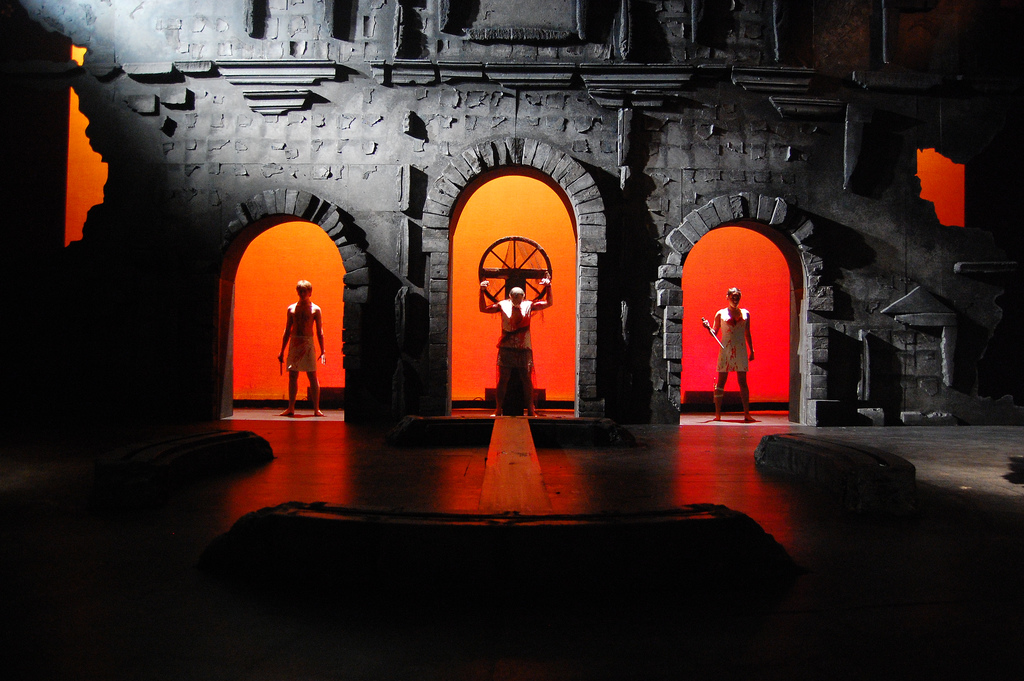
The past couple of weeks, I have not been able to get a Friday Flickr Lighting Porn photo up due to LDI and then Thanksgiving following the next week. This week, The Friday Flickr Lighting Porn is back in full force. This weeks randomly selected Photo Comes from @batfishlighting or better known as Jacqueline Steager. The image comes from Jacqueline’s lighting design for Troy: The Gates of Hell at the Little Theatre at San Francisco State University.
You can see more of Jacqueline’s Design for Troy: The Gates of Hell by visiting here online portfolio at www.batfishlighting.com. Want to see your lighting deign work featured on the Friday Flickr Lighting Porn? Add your photos to the iSquint Friday Flickr Lighting Porn Group on www.flickr.com. Photos are selected at random each week and feature lighting design wok of our readers.
Photo Credits: Claire Rice
Wybron Updates iSwatch iPhone App to 1.5
 Right before LDI 2009, I wrote a rumor that Wybron was working on an update to their iSwatch Gel Library iPhone app. Well, the rumor is confirmed with the latest press release from Wybron. One of the most important things to note about the update is the ability to locate local dealers based on your current location to get gels. As of right now, it is limited to Lee filters, but still a great addition to the App!
Wybron is pleased to announce an update of our popular Gel Swatch Library application for the iPhone and iPod Touch. Along with the addition of hundreds of new filters, Gel Swatch Library 1.5 is the only app in the lighting industry that allows users to access a map of dealers in their area. Geographical information for Lee dealers across the United States can be accessed from the user’s current location or zip code, with users able to call or email those dealers with one touch. Dealers from other parts of the globe, including Canada, will follow.
Features:
• On detail view, there is a button to scroll through CMY, RGB and Notes:
• This allows field to display larger.
• Notes consist of manufacturer notes for the gel (ie. stops, mired shift and usage information).
• Can’t read the whole note? Double tap on it to pop up a window with the complete note.
• Search now includes the notes field in the results.
• Names no longer overlap each other on comparison view.
• In list view, shake the device to go to a random gel in the current swatch book.
• Swatch books are now listed by manufacturer and then product line.
• Added Lee Urban Effect Filters.
• Added Rosco e-colour+ (Only available in Europe).
• Added Rosco cinegel.
• Added Rosco CalColor.
• Added Rosco Storaro Selection.
• Added Rosco cinelux.
The updated application is available for download immediately—as of December 1, 2009. Users who have already purchased iSwatch will find that their libraries will update automatically through the Apple App Store.
iSwatch runs on the iPhone or iPod touch and can be purchased through Apple’s App Store. Just click on the App Store icon from the main screen of each device, or access the App Store through iTunes.
[nggallery id=17]
FireSword-IV, When is a Flash Light to Bright?
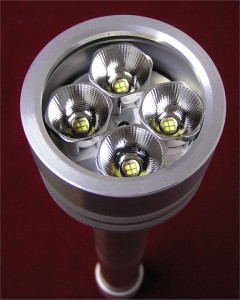 You have to ask yourself sometimes, when is a flash light to bright? My response, Brighter the Better Baby!
One of iSquint’s readers, Tobin Neis sent me a link this morning about something he read in Wired Magazine, the FireSword-IV from Elektrolumens. First things first, this thing puts out over 3,000 lumens. Talk about CRAZY bright! The FireSword is powered by four – 18650 Lithium-Ion Rechargable Batteries. It uses four – Cree MCE LED’s with custom 20mm reflectors. The LEDs have a life expectancy of 50,000 lamp hours which equals 5 years of continuous use.
The FireSword measures in at little over 1 foot long and just under 3 inches at the head. Elektrolumens does not mention what the FireSword is made from, but I would assume Aluminum, but weighs in at 3 lbs.
To learn more about the FireSword-IV, visit Elektrolumens website at www.elektrolumens.com. You can also purchase your very own FireSword from their online shopping cart for $399.99. But you might have to wait a bit on delivery, each of the Fireswords are custom built!
Tuesday Twitter Trivia – Twist-Lock Winner
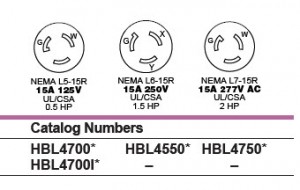 Yesterdays Tuesday Twitter Trivia question was any easy one yes? Well, before I announce a winner, lets learn a little more about the connector.
I received a bunch of direct messages stating that the image from yesterdays Tuesday Twitter Trivia was the NEMA L6-15 connector. Yes, that is correct. The L6-15 connector is a 15A, 250V connector that is most often used for 208V power for moving lights. What is the distinguishing trait about the L6-15, the ground pin has a nub that is pointed out, rather then in. Now, let’s throw a twist into the mix.
Can you name the 120v NEMA connector, L6-15 with the same in configuration?
If you can, Direct Message me @isquint or email me at info@isquint.net. Answer this question correct, you not only win one of the last remaining SeaChanger 2009 LDI Ducks, but also a little something special from me.
NOW
The winner of yesterdays Tuesday Twitter Trivia question is Stephen J. Moore, (@smoorecrux) from Minneapolis, Minnesota. You can see more of Stephen lighting design work at his website, www.stephenjmoore.com.
Baxter Controls Pocket iPhone DMX App
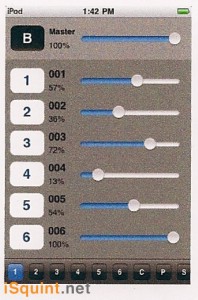 During LDI 2009, I got a chance to stop by the BCI or Baxter Controls booth to take a look at his latest product, the iPhone Virtual Pocket Console app. The iPhone app is still under development and is not ready for release as of yet. BCI did have a beta version of the App on their iPod Touch running the booth and the Par-B-Q cooker.
The Virtual Pocket Console App utilizes wireless network protocol to control DMX. The iPhone/iPod Touch connect to the BCI Pocket Console Net/DMX converter box to translate the signal to 5-pin DMX. I am still a little unsure if BCI is using Art-Net or not, but time will tell.
The Virtual Pocket Console can Patch up an entire universe of DMX512 and give you the ability to check dimmers, channel levels, and record simple looks.
A time frame or pricing has not been released yet. I am expecting to see something more about the iPhone app in the first quarter of 2010.
What to see more about the neat products from BCI, visit their website at www.dmx2go.com.
[nggallery id=16]
A Look Around LDI 2009
I took just a little bit of video this year at the LDI show in Orlando Florida. Some of it was taken just for this, a quick look at some of the different things on the show floor. Of course there is a couple of things I missed, but then there are some things that were not on the show floor. Can you find them? There is also a quick glimpse of a certain Bald Blogger too!
Tuesday Twitter Trivia – Twist-Lock
 Last week, I missed getting the Tuesday Twitter Trivia out. It was a busy week with LDI and then Thanksgiving! But no fear, the TTT has returned! This is an easy one this week.
Please provide the name and NEMA code for the connector pictured to the left.
If you have the answer you know what to do. If you don’t, please Direct Message your response to @iSquint via twitter. The first person in the the correct answer wins.
What is this weeks prize… A limited Edition, LDI 2009 SeaChanger Duck. Only 500 of these duckies were hatched and I have some of the last ones still looking for a home.
Good Luck!
Where is the Industry Heading: An Interview with James Bedell
This month, I interviewed James Bedell, a lighting designer that got his start in the theatre world and has since found a wide variety of work in the architectural and corporate lighting markets. Not to long ago, James got involved in design high end residential, commercial and retails spaces all around the world. More recently, he is a lighting designer for Abercrombie and Fitch working with head of lighting design Andrew Thompson. He continues freelance work, recently designing pop-up stores for Diet Coke in NYC and Boston.
In regards to paperwork, how has that changed from when you started to where you are now?
When I started everyone told me YOU MUST USE LIGHTWRIGHT. Everyone expects spreadsheets to look a certain way there MUST be a Channel Hookup, Instrument Schedule and a Color List. All those things are still necessary but not necessarily sufficient. I find my paperwork evolving on a case by case basis. I do more architectural work now than entertainment. So I don’t use Lightwright any more, I use MS Excel because it’s common, and I know whether I’m walking into a regional theater in Rochester or a new store in Tokyo people will be able to read the file.
Light plots are obviously a must for theatrical productions and Vectorworks is still my weapon of choice. That said architectural paperwork is generally created and maintained in AutoCad, which I use far more often.
But when it comes to paperwork now, I’m becoming more and more obsessed with documenting design decisions for future replication. When I have to light a 4 story mural, and have my boss, my boss’ boss, and my boss’ boss’ boss sign off, I want to make sure it looks the same a year from now. That means lots of documentation of barndoor apertures, lots of images, and concise readable documents.
What are your thoughts on LED’s in general for use within the industry?
LEDs are the future of lighting design there isn’t much question about that. But there are some big barriers to wide acceptance. First off all theatrical LDs and Architectural LDs see this issue almost completely differently. Since I sit somewhere in between I get to play both sides of the fence on the one hand the simple tech geek in me loves seeing all the new toys, and in entertainment projects I like to test them out. But for architectural applications, you have to be more careful and bin matching (so that 3000k really means 3000k) is still not where it needs to be.
What challenges do you face with the ever changing console architecture?
Since I do less entertainment work now adays I feel like I need to come back to console land and relearn everything. Most of my advanced lighting control needs surround LEDs and scenes in an architectural application. But the next time I do a big show, I’ll need to sit down with a programming pro and decide what console is right for my project and my lighting style. When I work on a show, particularly a theatrical production I find myself inserting dozens of cues, cue 25 morphs into cue 25.9 because I decided to build in a 4 step fade. I love to bring cinematic transition to theatrical work, and often, especially with limited budgets your cueing structure can go a long way to enhancing the look and feel of a show.
Does 3D rendering provide a reliable method for developing a concept while designing out a production?
I think 3D rendering is subject to the law of diminishing returns. The time it takes to build proper renderings often doesn’t justify what you can do with a pencil and scale ruler. The technology for rendering has gotten better and better, but I need the whole process to happen faster or it’s not worth it. If I can sit with a plan, elevation, and section, my swatch book and a pencil and do the same thing in 1/2 the time, then I’ll do that.
The only caveat there is the client. Sometimes, a detailed shining rendering in 3D sells them on your concept in a way words and sketches can’t…as a communication tool sometimes it is totally worth the time investment.
Do you feel that projection media is a form of lighting or should it be considered a separate field?
Projection media isn’t lighting design. But just like the scenic designer or working with an architect, they are an integral part of the design team. Far too often I see projection design and implementation back-ended on a production to the detriment of all the other design disciplines.
Looking back at a past production, how would you change it with some of the latest technology out on the market today?
When I did the Crown Point Festival a few years ago, in the interest of the budget I ended up trying to use what was in house and minimize my rental. This was the wrong move. In the end, I would have done more every production on the roster if I had a moving light package LED wash lights and a kick-ass programmer. Instead I tried to go low-budget theater on it, and gave everyone headaches.
What new or upcoming technology has the potential to change the lighting industry?
LEDs and lighting control systems are still the most rapidly evolving technologies out there. Both in the architectural and entertainment worlds. Is anyone specifying the same LED fixture and console they were 5 years ago? No way…the technology is moving way too fast for that.
Look for LEDs to get brighter with better white color matching, and look for consoles to become more and more user friendly, more software based, less button pushing.
What advice can you give to a beginner looking to make it in the industry?
Diversify. I love theater and dance, deeply. If I could do nothing but lighting dance everyday, I’d be a happy guy. But the truth is this industry’s main growth sectors aren’t in traditional theatrical entertainment, but in architectural lighting and in so-called “architainment” a major retail trend is surrounding the idea of “the experience economy” these are major opportunities for LD’s so, I would say, think outside the theatre.
Do you have any tech-table rituals or traditions?
I can’t say I have a tradition. But I do need a wide berth at the tech table. When I light a production I become something of a surrogate director, I love to stand up, point, move my hands around….really explain what I’m going for. Tech is fun for me…
What is your favorite gel color and why?
This is an odd one, but R53 became a favorite of mine when I coordinated lighting at the Schimmel Center at Pace University. There was a ton of even turn over, and lots of corporate conferences to light so I found myself experimenting with new key light and wash light colors. I found R53 to be the color that highlighted various skin tones when mixed with an N/C key light. And I didn’t go to Yale, so I don’t have to use L201 for everything.
More about James Bedell
 James studied lighting design at Pace University, where he went on to become lighting coordinator for the Schimmel Center for the arts. Coordinating the lighting needs for a wide variety of clients from Inside the Actor’s Studio, to MSNBC, the Beijing People’s Theatre and a wide variety of corporate, theatrical, and dance clients (he even got yelled at by Kanye West once). James developed his skills while lighting a wide variety of off and off-off broadway productions in NYC. Since then he’s moved into architectural lighting. Three years ago, he began working for Tirschwell and Company, designing high-end residential, commercial and retail spaces. More recently, he is a lighting designer for Abercrombie and Fitch working with head of lighting design Andrew Thompson on flagship stores around the world. He continues freelance work, recently designing pop-up stores for Diet Coke in NYC and Boston.
You can read and learn more about James at his websites, jamesbedell.posterous.com or www.build2sustain.com.
UPDATE: I corrected James name, sorry about that!
The Piranha By PocketToolX.com
 Tools tools tools, we can never have enough tools. But what about tools that do more then one job? How about The Piranha from PocketToolX.com?
The PIRANHA is a single-piece, multi-purpose pocket tool that is constructed from heat-treated and corrosion-resistant S30V Stainless Steel with a built-in neoprene double-ended driver bit holder.
Keep this slim tool in your pocket and you’ll always be able to tighten screws, loosen bolts, pry things open and pop the tops on your favorite beverages.
Once I read that the Piranha opens my favorite beverage, I was SOLD! Here are some more features of The Piranha:
- S30V Stainless Steel 0.160″ Thick
- Heat-treated to 58-60 HRC
- Smooth stone-washed finish
- Double-ended bit holder (P2, #8)
- Open and box Wrenches: 9/16, 1/2, 7/16, 3/8, 5/16, 1/4
- Bottle opener, nail puller, scraper and pry ends
PocketToolX is taking pre-orders right now through their website, www.pockettoolx.com. US and Canadian orders receive FREE shipping for all pre-orders which are expected to begin shipping in December. For $49 USD, this just might be a great stocking stuffer for the techie in your life!
Via: Engadget
Clear-Com’s Two-Channel Tempest Wireless Intercom
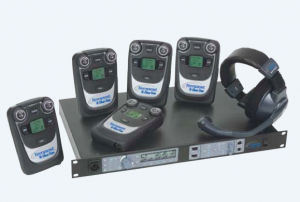 Clear-Com, one of the leaders in intercom systems announced a new addition to their Tempest 2400 2.4Ghz wireless Intercom Family, the Tempest two-channel wireless intercom system. While at LDI, I did not have a chance to stop by the Clear-Com booth and take a closer look at this, but here is more information from the press release Clear-Com sent out after the show.
As with all members of the Tempest family, the two-channel Tempest2400 utilizes a patented Frequency Hopping Spread Spectrum RF scheme that not only avoids the need for licensing and frequency coordination, but makes it fundamentally resistant to interference from other wireless devices. This ensures that no matter how crowded the RF environment, communications will go off without a hitch. In addition, once registered to a base station, a beltstation needs no further configuration and roams freely within a single coverage area.
Each Tempest2400 base station supports up to five full-duplex, two audio-channel digital wireless beltstations; by stacking up to 10 base stations together, 50 independent, full-duplex wireless beltstations can operate together in a single system. Other major features include state-of-the-art 2xTX Transmission Voice Data Redundancy and its interoperability with Clear-Com and other intercom systems through two-wire and four-wire connections.
Additionally, the iSelect™ roaming feature allows a beltstation user to move from one coverage area to the next by simply changing the beltstation’s association to another base station; each beltstation can be paired with up to 64 different base stations. Each Tempest2400 wireless system includes T-Desk software, a powerful PC-based control and configuration application. T-Desk offers the ability to monitor and manage the entire wireless system from a remote location via Ethernet connection to a LAN. A PC running T-Desk can also interface with a base station via direct connection over CAT-5 cable.
All members of the Tempest2400 family include an optional remote transceiver that allows remote antenna placement up to 1,500 feet (450 meters) from the base station; data connection and power supplied over standard CAT5e/6 cable with lightweight, fast-charging Lithium Polymer (Li-Poly) battery technology in the beltstation; access to one of six relay closures from the beltstation and vibrating call alert. In addition, a flexible battery solution allows beltstations to operate on standard AA batteries for emergency use; beltstation battery telemetry is displayed in real-time on the beltstation and base station LCDs, indicating how much power is left in each pack.
for more information on the Tempest two-channel intercom system, visit Clear-Com’s website at www.clearcom.com.
Lumens in the Air with LumenRadio
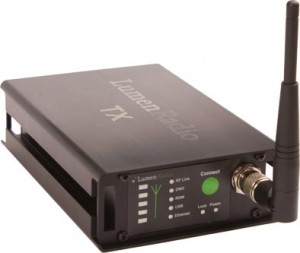 One of the newer products that I got a chance to play with at LDI this year that wasn’t an LED fixture was the LumenRadio system. LumenRadio made it’s debut into the entertainment lighting industry at the PLASA show this year and took home PLASA’s 2009 Award for Innovation.
LumenRadio is a wireless system to send DMX information over a wireless network. What is unique about Lumen Radio is that it is the first smart wireless system to automatically adapt to its surroundings. Meaning, that the Lumen Radio system looks for open or un used space on a wireless bandwidth and takes advantage of that un used space to transmit and receive DMX singal.
LumenRadio launched uses a wireless technology called CRMX which stands for Cognitive Radio Multiplexer. CRMX was specifically developed to meet the demand for reliable, easy to use, and cost effective wireless lighting controls.
So what does Cognitive Coexistence mean for us?
Wireless DMX distribution systems operate on the same license free frequencies as W-LAN (WiFi), ZigBee, Bluetooth, some wireless intercoms, etc. Interference between such systems has been a growing problem in the industry with no available solution. CRMX is the first system to continuously scan the radio spectrum and dynamically adapt its frequency hopping patterns. This eliminates interference and maximizes performance of all radio systems in the same radio frequency sphere. In short, it’s a smart radio that adapts without having the user doing anything at all.
CRMX Nova features a number of unique features, such as:
- Automated Cognitive Coexistence. The unique CRMX technology makes sure that your wireless transmissions never disturb, or are disturbed by, other wireless equipment. This fully automated feature offers unrivaled convenience and peace of mind during operation.
- Fidelity. The DMX frame output is identical to the frame input. DMX frames will not be only half updated.
- Error correction. Advanced algorithms recreate corrupt or lost radio packets.
- Compliance. Non-compliant DMX signals are corrected to meet the DMX512-A standard.
- DMX synchronization. Precision timing mechanism guarantees synchronized frame delivery. The DMX frame will be outputted at all of the receivers synchronized. This ensures that no time differences occurs is the signals.
- Low latency. Industry best; below 5ms even in multi-universe systems.
- High security. Strong 128 bit encryption keeps hackers out.
LumenRadio has a number of products to transmit and receive signal all in various “sizes”. You can go from a single universe of DMX on the CRMX Nova TX, to two universe with the CRMX Nova TX2 and finally the CRMX Nova TX2 RDM which transmits both DMX and RDM, (Remote Device Management).
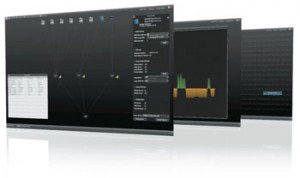 What caught my attention at the LumenRadio booth was their SuperNova software. CRMX SuperNova is an RDM Controller that comes free of charge with LumenRadio’s CRMX Nova™ RDM products. CRMX SuperNova lets you set up, monitor and troubleshoot RDM systems. Once you have connected your devices, just run a discovery process that will find all your RDM enabled devices in the network. You can map your RDM transmitters and Recivers in an view similar to how you physically have them laid out and click on each of the devices to “identify” them as well as get vital information from them.
SuperNova also give you a graphically view of the full spectrum of wireless signal to see where open sections of the spectrum as well as limit which part of the spectrum to use or avoid. On the RDM side, you can quickly re-address a device any where on the DMX universe by simple clicking and dragging the device to it’s new address. The entire SuperNova software runs on Java and is able to work on any platform of computers.
For more infomation on the SuperNova Software or any of LumenRadio’s products, visit their website at www.lumenradio.com.