ETC Releases New iOS App – Selador Toolkit
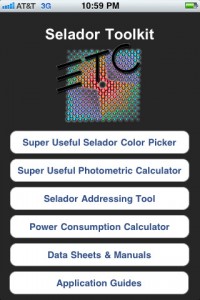 Seems like ETC is pumping out iOS apps left and right lately. Earlier this week they released their ETC Rigging App and just yesterday their latest app, the Selador Toolkit.
The Selador Toolkit application – with features for both beginners and professionals – allows designers to mix their favorite colors and determine which models to use. The app also includes calculators to help stage electricians set DMX addresses for a series of Selador fixtures and gauge power usage. Data sheets, manuals, and application guides are provided to help accomplish the best overall results.
The Selador Toolkit app is FREE from the iTunes App Store and is a universal app, meaning that the same app works both on the iPhone, iPod Touch and the iPad. Head over to the iTunes App Store and pick up your FREE copy of the ETC Selador Toolkit App.
ETC Releases New iPad App – ETC Rigging
 The ETC Rigging app is an interactive tool for demonstrating the unique aspects of ETC’s line of rigging products. Users can experience the benefits of the compact Prodigy™ hoist system, or find out how the ETC’s compression tube system can save money when planning new construction or renovating an existing venue. The app demonstrates how ETC’s cable management system tucks neatly away and how the user-friendly QuickTouch™ control system works. More information about ETC’s rigging line can be found at www.etcrigging.com.
You can download the FREE app from the iTunes App Store.
New iOS App On Its Way: FreeStyler DMX Remote
A new lighting app to hit the iTunes App Store in the next couple of weeks will be the FreeStyler DMX Remote App. You may have heard of the Windows based software title, FreeStyler. The upcoming iOS app will be a companion app to the Windows software and requires version 3.3.2 of FreeStyler. Get ready for this… the FreeStyler Windows software.. FREE! You can download the FreeStyler Windows software from www.freestylerdmx.be, and yes, it is in English.
Max Bäumle, the developer of the upcoming iOS app sent me a quick video showing off how the new iOS app works. As you can see from the video below, you have full control of any fixture including the color picker and pan/tilt. The app also allows you control of blackout, favorite, freeze, groups, sequences and flash buttons through the FreeStyler software.
The FreeStyler App is expected to hit the iTunes App Store in march 2011. Look for an announcement here on iSquint.
Review: iPad App: sling Note
Its a web browser. No, its a note pad. Wait, its a calculator. Maybe its a scrapbook. Better yet, its all of the above. sling Note is an app for iPad that gives you a browser window or calculator side by side with a notepad/scrapbook.
The usefulness of this app is apparent for anyone who has searched through site after site printing out ideas or images. Using its built in capture ability you can drag sections of websites to your scrapbook page and it will move as a graphic you can enlarge or shrink and arrange by piece. sling Note also copies the URL from the page and keeps the information with the scrap.
The calculator is a basic, everyday calculator. However, it gives you the ability to drag and drop the total to and from the scrap page. The scrap page also functions as a note pad capable of text bubbles for page cuts, standard text, or hand (or finger) drawings. One of the nice things about sling Note is that you can also pull information from PDF, DOC, XLS, Pages, Keys, and Numbers files. You can also pull photos from the internal album.
Once you have collected all the information you need, you can then save the note book and start a new one. It uses the same organizational structure for documents as Pages and Numbers. You also have the option of exporting PDF’s to either an email or your Bookshelf.
While not a lighting app in the strictest sense, sling Note definitely holds a soft spot in my App collection. Check it out in the iTunes App Store today. There is a paid version $2.99 USD and a FREE or “lite” version.
[nggallery id=100]
New iOS App – Not Dip Switch Calc, But Binary Calculator
 I have to start this one off with what the developer wrote on the apps description page, it says it all.
Nothing special but simple and easy to handle.
Did you catch that? Nothing Special, love it. Now is the developer just being modest or truthful, you decided. There really is nothing special about this app. It is just like all of the other Dip Switch apps out there. The main difference is that it is giving you the “binary” number.
Guess what, that is what we are doing when we address a fixture or device. ;) Funny how that all works out. With the Binary App you can enter a number and it will show you which position the dip switches need to be in, or the reverse, set the dip switches and it will tell you the DMX Binary number.
New iOS App – DMX Focus
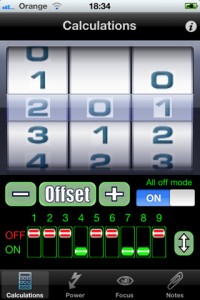 A New iOS app out on the market is DMX Focus by Foo Bar Interactive. Yes, it is a DMX dip switch app… but wait it does more! At least it better for a paid app. The app also has a basic power calculation section, DMX fixture focus ability and a notes section.
I am not going to get into the dip switch part of the app. It’s not like we haven’t seen this function before in an iOS app. What is neat is the focus part of the app. From the description:
DMX focus acts as a cost effect riggers focus remote to send messages to communicate with DMX512 lighting rigs. The App communicates over WIFI to a computer via a router or ad-hoc network and sends Open Sound Control messages to the EnttecOSC drive program which is designed to interface with the Enttec Pro USB Dongle. The system allows for DMX address queues to be defined, allowing the user to move up and down queue lists, sending ‘Full’ and ‘Clear’ messages to DMX channels , i.e. send HIGH / LOW values straight out to the Enttec Pro USB Dongle from their iPod or iPhone.
To learn more about the DMX Focus app, fire up your iTunes App Store and purchase the app for $1.99 USD.
Useful Development Re-Releasing USITT App for iOS AND Droid
 I just heard from the iOS developer, Useful Development, that they are re-launching the USITT App for this years Conference and Stage Expo in Charlotte North Carolina. You may remember last years conference when Useful Development announced and released the iOS app, USITT 2010, as a replacement for the printed conference and stage expo guide. The app served as a tool to locate sessions, conference events and of course a map to the stage expo to find any given exhibitor you may have been looking for.
With the upcoming release, it not only is getting update with the 2011 conference and stage expo information, but a couple of other useful additions. I am not sure yet what some of these new features may be, but one thing now iOS device owners will welcome, the USITT app will be available for the Android as well!
Useful Development has taken all of the feedback and advice from last years conference and revamped and reorganized the app to make it even more powerful of a tool while in Charlotte. Be on the look out for more information about the USITT app during February.
Hold the Phone, ANOTHER Dip Switch App – Clair DMX Lite
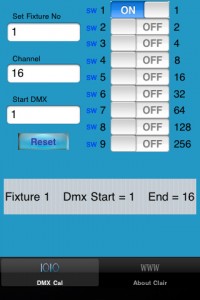 I am having a case of déjà vu here. It seems like I just wrote about this same tyoe of program very recently… :/ While I could go off on a real tangent here and talk about how the iTunes App Store is over run by DMX Dip Switch Apps… I won’t. Just think of all of the different apps as choices.
The Clair DMX Lite App is yet another DMX Dip Switch App. What sets this app different from the rest of the dip switch apps out there… not to much. The only real difference is the About Clair button on the bottom of the app. From there you can learn more about SLPro Trading’s LED and moving light products.
From the brief research that I have found, SLPro Trading is manufacturer and or distributor in Singapore. While the app may offer a bit on the fixtures, the only website I could find even remotely related to this company is 1980 with little or no information.
As for the Clair DMX Lite app, you can pick it up for FREE in the iTunes App Store. Think of it as another app to add to the almost full DXM dip switch folder on you iOS device.
Another DMX Dip Switch App Shows up in iTunes – DMX Dip (FREE)
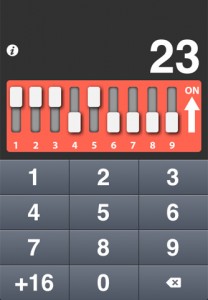 Just when you thought that the DMX Dip Switch market place was saturated enough on the iTunes App Store, another one shows up. Now the good news is, the DMX Dip app is a FREE download from the app store.
DMX Dip is exactly as it sounds, it calculates the DMX address on fixtures that use dip switches for addressing. The reverse operation is also possible, just use the dip switches in the app like you would use real-life switches, and DMX Dip tells you exactly for which address the fixture is configured.
The app also offers an off-set function for addressing multiple fixtures. You can pick up the DMX Dip app for FREE from the iTunes App Store. The app is universal and works nativity on the iPad, iPhone and iPod Touch.
Synthe FX Release New iPad & iPhone iOS App and LCompanion Software
Synthe FX has been hard at work these past couple of months. First updating the iPhone app of Luminair and then releasing Luminair for the iPad. Now with the release of the Mac App Store, Synthe FX has been working over time to bring even more updates to the iOS apps along with the LCompanion software for transferring and updating files for the iOS apps. Here is more from Synthe FX.
Synthe FX has announced the release of Luminair for iPad v1.2, which adds new features such as support for external MIDI control over Wi-Fi networks, as well as support for direct transfers of PDF paperwork from Cast Software’s WYSIWYG R26.
Expanding on the new external MIDI, MSC and OSC remote features recently added in v1.1, Luminair for iPad v1.2 adds the ability to use RTP MIDI over a Wi-Fi network, for wireless control from any MIDI control source connected to a Mac, PC or other compatible equipment. Luminair’s use of the CoreMIDI framework found in iOS provides low latency over a Wi-Fi network.
Version 1.2 also adds support for the latest version of Cast Software’s WYSIWYG lighting pre-visualization software, which was recently updated to R26. WYSIWYG R26 adds the ability to directly transfer PDF paperwork to Luminair running on an iPad, iPhone or iPod touch. Luminair provides a customized interface for browsing these paperwork files, making it easy for users to quickly reference important information without closing the app.
Luminair for iPhone was also recently updated to v2.2, which adds an “in-app” PDF reader, as well as the WYSIWYG PDF paperwork transfer features found in Luminair for iPad. Users can now transfer and open any PDF file in Luminair for iPhone.
Additionally, Synthe FX has announced the release of LCompanion v1.0, available in Apple’s new Mac App Store. LCompanion is a free Mac OS X app that allows Luminair users to both build and save custom fixtures profiles, as well as transfer project, fixture, image, and PDF files back and forth from a Mac to an iPad, iPhone, and iPod touch device.
Luminair for the iPad brand new is $129.99 USD. Luminair for the iPhone/iPod Touch new purchase price of $99.99 USD. Now, if you own either iOS app, the new update to either app is FREE from the iTunes App Store. You can learn more about all the new updates by visiting Synthe FX web site at www.synthe-fx.com.
Celebrate New Year’s Eve Like You’re in NYC with Times Square 2011 iOS App
 There is just under 35 hours left in 2010! I have heard that celebrating New Year’s Eve in Times Square is something not to miss, the lights, the partying and just the excitement of what the New Year will bring. If anything, it is something that you have to try once in your life. I personally still have not made it up to New York City for New Year’s Eve, but it is on a list some where of things to do.
Since most of us can not make it to Time Square in 35 hours to celebrate the dawning of the New Year, why not bring the Times Square celebration to your iOS device? That’s right, Apple’s tag line for iOS apps hold true once again, “There’s an app for that”.
Countdown Entertainment, the iOS developer of the Times Square Offical New Year’s Eve Ball App – 2011 has announced the release of the app into the iTunes App Store! It brings New Year’s Eve in Times Square LIVE to your iOS device.
Some of the features of the app:
- Submit your New Year’s photos of friends and family for others to vote on. The most popular photos will be featured on the Toshiba Vision sign atop One Times Square, right below the new Year’s Eve Crystal Ball.
- Get live updates about news, weather, photos and the LIVE show schedule happening December 31st in Times Square
- Send New Year’s Eve Kisses to friends and family
- Watch live streaming of events in Times Square leading up to New Year’s Eve
- Customizable Countdown Clock with Time zone recognition.
- Chick-in via Foursquare, Facebook and twitter to find out how far away you are from Times Square.
What a neat app right?! Best part… FREE! Head over to the iTunes App Store and download a copy for yourself and start celebrating!
[nggallery id=95]
iOS App: Remote-Seq for Martin LightJockey
 You may have heard about BLAST Co before. Earlier this month they released an iOS app called Remote-Cue. Just like Remote-Cue, Remote-Seq is an iOS app that connects and functions with Martin Professionals LightJockey control software.
The Remote-Seq App allows you to remotely SquenceFlash any playback with in your LightJockey show right from your iOS device. You can Sequence latch/flash playback which can be assigned and play back in any of the 20 banks of 10 pages.
Remote-Seq also offers a MasterControl function too. MasterControl can be used as a Fade in/out and Black Out or Restore. MasterControl is not a fader, but executes with a single button that has timing from one second to 10 seconds.
Learn more about BLAST Co’s Remote-Seq app and pick up a copy of the app for $2.99 USD from the iTunes App Store.