Attn Lighting App Developers, Get Your Droid Apps on Amazon App Store
 This is a call to action for all those lighting app developers out there. I recently took a step towards the droid side of the world. NO, I am not giving up my Apple ways. I still love and use my iOS device daily… most times hourly! I recently acquired a Amazon Kindle Fire. It is the latest Kindle from amazon which features a multi-touch display in color and all that jazz. It runs a version of the Android OS. I’ll explain more about that later.
I recently took a stroll through the Amazon App Store on the Kindle. Yes, Amazon has setup a separate app store for apps to go onto the Kindle Fire. Seems odd to me as the apps are the same thing found on the Android Market Place. Maybe it is Amazon trying to follow Apple’s lead and control which apps are avilable on the Kindle Fire.
Regardless. If you are an Android App developer and have a lighting app on the Android Market Place, I encourage you to add it to the Amazon App Store. From my limited research, it is as simple as registering your current app with Amazon. There are already a hand full of lighting apps on the Amazon App Store. Join the bandwagon and get your on there too!
Visit Amazon’s App Store Developer Page to learn more about getting your Droid apps on their store. If you join now, Amazon will waive the $99 developer fee for the first year!
Lighting Handbook App Now Available on Android Market
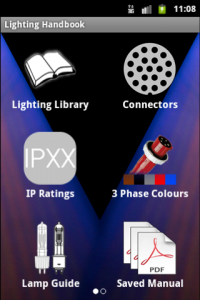 Andrew Derrington, the app developer of the popular Lighting Handbook app recently announced that the app has been translated to the Android platform. In this first release it has all the core features that the iOS version has, and in time will gain more features such as Searching, Submit a fixture, Lighting Calculator & Electrical Formulas in app purchases and more.
Using a new universal database system it has the same fixtures as the iOS version and is updatable through the settings menu. If your device is connected to the internet, the manual is then available for viewing right within the app. You can also store manuals for offline viewing either within Lighting Handbook or in your favourite PDF viewing app.
The library of manufacturers can be updated from within the app – Go to the settings menu, from there you’ll be able to see what version of the library is currently installed and if connected to the internet, what version is now available for download. Click the “Update Library” Button and it will download the latest library and install into Lighting Handbook.
Lighting Handbook is a tool for all theatre, corporate and event technicians.
It displays information on over 750 moving lights, Dimmers, Conventional fixtures & effects:
• Weight
• Power Consumption
• Data Connection types
• Light Output (According to manufactures manual)
• Colour wheels/Mixing
• Gobo Wheels
• How many DMX Channels and in what mode
• Beam Size
• Lamp type
Dimmer Info:
• Mains connectors
• Mains out?
• Data Connectors
• Dimmer connections
• Max Channel count
• Max Channel current
• Max current per phase
• Weight
• Dimensions
• Channel to phase info
• Any additional feature
You can purchase the Lighting handbook app for the Android Market for $4.94. For iOS users, you can purchase the app on the iTunes App Store for $4.99.
AutoCAD WS App Now on Android Market
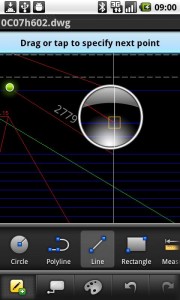 AutoCAD released their mobile version of it’s CAD software, AutoCAD WS on the Android Market Place today! Here is more about the app for Android.
AutoCAD WS is a mobile CAD application that gives you the freedom and flexibility to view, edit, and share your DWG files on your Android phone or tablet. AutoCAD WS mobile app offers a simplified, intuitive set of viewing, editing, and markup tools so you can work on your designs while you are on the go. Open drawings from email attachments, sync your files from the web, or upload drawings directly from AutoCAD software. Drawings can also be saved locally so you can work in the field without an Internet connection. Experience the freedom of taking your designs with you—wherever you go.
*Requires a multi-touch device running Android 2.1 or above. Recommended devices include: 1GHz processor, 512MB RAM.
AutoCAD WS for the Android platform is a FREE download from the Android Market Place. Learn more about AutoCAD WS by visiting www.autocadws.com. Yes Apple users, there is a FREE iOS version of the app!
Thanks @DavidrWhitney for the tip!
Zero88 Releases ZerOS Remote App in Android Market
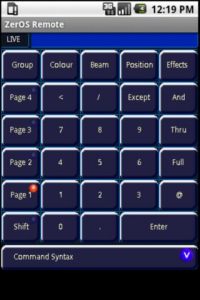 Zero88 just let lose their app for the Android OS in to the Android Market Place.
The ZerOS Remote Android app allows remote control of any ZerOS console. The app allows users to control their lighting rig from their Android device. From channel levels to playback the ZerOS Remote offers full control of the Leap Frog 48, Leap Frog 96, Frog 2, ORB and ORB XF consoles.
The ZerOS Remote App for Android looks almost the same as the iOS app from what I can tell from the pictures. If you have an Android Device, head over the the Android Market Place and pick up the ZerOS Remote app. It is a FREE download.
You can learn more about the ZerOS Remote App from Droid by visiting Zero88’s website at www.zero88.com.
Useful Development Re-Releasing USITT App for iOS AND Droid
 I just heard from the iOS developer, Useful Development, that they are re-launching the USITT App for this years Conference and Stage Expo in Charlotte North Carolina. You may remember last years conference when Useful Development announced and released the iOS app, USITT 2010, as a replacement for the printed conference and stage expo guide. The app served as a tool to locate sessions, conference events and of course a map to the stage expo to find any given exhibitor you may have been looking for.
With the upcoming release, it not only is getting update with the 2011 conference and stage expo information, but a couple of other useful additions. I am not sure yet what some of these new features may be, but one thing now iOS device owners will welcome, the USITT app will be available for the Android as well!
Useful Development has taken all of the feedback and advice from last years conference and revamped and reorganized the app to make it even more powerful of a tool while in Charlotte. Be on the look out for more information about the USITT app during February.
Lighting App Coming for Android
Listen up all of you Droid users. Look like a gent out of the UK is working on a Lighting App for you. From the very short YouTube video it looks like the app is still in heavy development. But it shows that someone out there feels your pain of not having any Lighting Apps for the Droid. I have not been able to locate any additional information about where the app is or when it will be released. I’ll keep my eye on the development of the Droid App.