ESTA Foundation Announces eSet App for iOS
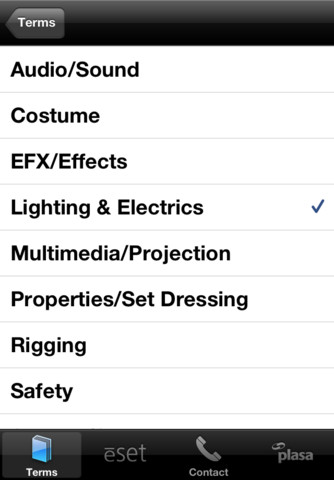
The ēSET (Essential Skills for the Entertainment Technician) body of knowledge developed and vetted by industry professionals has now been released as an iOS app available for download in the iTunes store.
The body of knowledge has been available on the ESTA Foundation site but ēSET committee member Dana Taylor thought it needed to be even more mobile so he decided to work to make it an iOS app.
The creation of the ēSET program was born of the realization that many current entry-level entertainment technicians lack fundamental knowledge and skills related to the industry. The resulting goal of ēSET is to provide technicians with the knowledge and skills they will need to function effectively across all fields of the live entertainment industry and a tool to organize and guide their learning.
The user of the ēSET program will be able to focus on self-selected topics utilizing a sequential approach to learning drawn from a database of textual and graphical content related to entertainment technology. Further, ēSET provides tools to better assist the user in organizing selected materials in a meaningful fashion, enhancing the learning experience and providing a ready reference to important data.
- For educators, the availability of in-depth materials and the ability to organize them for students will better enable them to assist and engage student learning while providing the student with the most up to date information available.
- Facility managers will be able to collect venue-specific information to better assist in the training of their workforce.
- Employers will have a new and powerful tool to identify employee skills and readiness for work and a mechanism to support further training of their staffs.
- Individuals will have a vast source of technical support materials literally at their fingertips.
The 99 cent ēSET app offers educators, managers, employers and individuals an on the go tool by which they can teach, learn and prosper within the industry. You can download the ēSET app from the iTunes App Store.
New iOS App: Palette iRFU For Strand Consoles
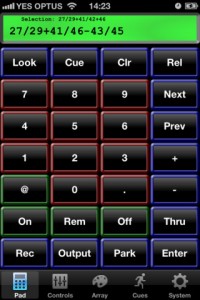 For all you Strand fanatics, good news, there is now a Remote Focus Unit app available for you on your iOS device! The app is not an official app from the Philips/Strand Lighting company, but from a third party app developer, Backstage Solutions. These are the same people that made an RFU for the Palette Series of desk that is web based, mRFU.
Here are some of the features of Palette iRFU:
- Channel/Fixture and Output control with ability to Park channels
- Attribute controls; Color Picker, Position Pad and basic access to several other attributes
- Access to the Palette button array; Which can get selection information for the group palette and will set attributes of the remotes selection for Position, Color and Other.
- Cuelist display and controls
- Go, Stop, Release and Jump to cues.
- Rotate device to the left for a virtual looks view. With live feedback from console
- Rotate device to the right for a grid of channels or outputs
- Also with live feedback. The grid allows you to tap fixtures to select/deselect, press and hold to see patch information.
If you are a Strand User, header over to the iTunes App Store and pick up a copy of Palette iRFU. Through the month of January, Backstage Solutions is running a 40% off sale which brings the app to $26.99 USD.
New iOS App – Easy Remote…or is it LumiDesk Remote?
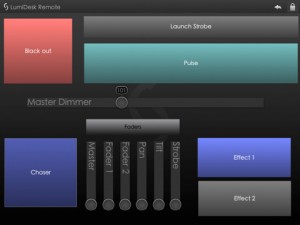 Ok, this one is throwing me off a bit. The OFFICIAL title of the app in the iTunes App Store is Easy Remote, even the icon says Easy Remote. BUT, when you look at the screen shot of the app, it says LumiDesk Remote. Personally, I like the name LumiDesk!So which is it?
NOW, here is what the developer has to say about the app:
This little app allows you to trigger scenes and change faders on a wide range of DMX lighting software.
Umm, really, that is it? Can you give us a little more details. You had me at trigger, but how does it connect? I need a little more then just 19 word description. After visiting the Easy Remote Support page… I am even more confused. The app is developed by Lightingsoft AG, but the website is all about Nicolaudie products, like the STICK Remote and Sunlite Controls.
Wait for it… it gets better. I consider myself pretty tech savey, I can figure this app out, I know DMX, artnet, and networking. It cannot be that hard to hook this thing up to any DMX lighting desk like it says. Well, I failed, but not due to trying, it is the app, not me. All I get is No controller available… and a Refresh and Info button. There is NO WAY to figure this out. Come on, give us a hint. You would think info might hold the key, not true, it listed the copyright info and build date. Well, that was sure fun.
The only thing it has going for it’s self at the moment is it is a free download from the iTunes App Store. If you can figure out how to get this up and running, I would love to hear it. Right now it is just wasting 1.6 mb on my iPad. This app has potential, but it needs a user manual or at least another sentence about HOW it works. Oh, and it only runs on the iPad…?
New iOS App – LightLogic
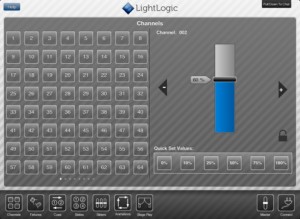 LightLogic is a theatrical lighting control system for iOS designed to work as an independent system. Use custom controls to quickly and easily setup fantastic looking lighting states, manipulate fixtures using purpose-built controls, communicate using the built in text chat and create complex lighting interactions using animations (iPad only).
The system is also designed to allow you to work as a team, instead of on your own. You can connect as many iOS devices running LightLogic to a single server and every device gets to control and manipulate the rig just as well as the rest. Use this feature to get your lights onto the rig, focused and ready to roll in record time.
In order for the system to work, you must have an Enttec DMX USD Pro connected to a Mac running OSX 10.5 or later. For more information or to purchase, ($49.99) the LightLogic App, visit the iTunes App Store.
Andrew Derrington Introduces New iOS App; Lighting Calculator
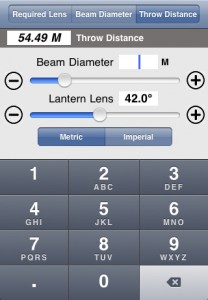 iOS App developer Andrew Derrington is at it again. He has been hard at work on his third lighting app for the iOS platform, Lighting Calculator. Some of his other iOS apps include the Lighting Handbook and the Electrical Formulas app. I know what you are thinking, these apps seem to be the same thing just different titles. You might be wrong there.
Take a look at what the Lighting Calculator app has to offer.
Beam Angle Calculator:
• Required Lens – Provide the distance and desired beam size and the app will tell you what size lens you’l need.
• Beam Diameter – Provide the distance and lens angle and the app will tell you how big a pool of light you’ll have.
•Throw Distance – Provide the beam size and lens angle and the app will tell you how far a throw is required.
Gobo Projection Calculator:
• Image Size – Provide the app with the gobo image size and throw distance, select the lantern your using and it will provide the projected image size.
• Gobo Size -Provide your desired projected Image size and throw distance, select the lantern your going to use and it will provide you with the gobo image size you need. – Handy when designing your gobo’s!
All measurements are available in Metric and Imperial, and more lanterns will be added regularly. In time a database covering over 500 lamps both conventional and moving lights will be added for easy selection and reference.
To learn more about the Lighting Calculator app, visit Andrew’s website at www.aderrington.co.uk. You can pick up a copy of the app from the iTunes App Store for $2.99 USD.
Lightwright Touch App Now On the iPhone With Version 1.2
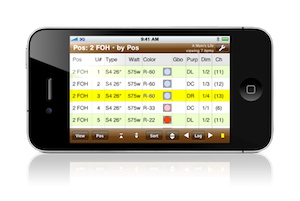 Lightwright Touch version 1.2 is now available, adding iPhone and iPod touch support to the mobile Lightwright worksheet app. All of the functionality of the iPad version has been squeezed into the smaller screen space with minimal sacrifices. Worksheet files exported from Lightwright 5 for iPad can now be viewed, navigated, and edited on iPhone or iPod touch, and changes can be reconciled back into the original Lightwright 5 show file. A dozen new or improved iPad features are also included in the free update. Lightwright Touch requires iOS 4.0 or later, iPhone 3G or later, iPod touch 2nd generation or later, or any iPad. See www.pocketlighting.com for more information.
For $49.99, you can download Lightwright Touch for both the iPhone and iPad be visiting the iTunes App Store.
New iOS App – DMXuLate
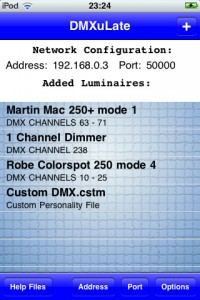 DMXuLate is essentially a wireless DMX remote. It allows for the control of any DMX compatible luminaire(s) completely wirelessly – a very much more affordable and portable alternative to a DMX console!
DMXuLate works by wirelessly sending UDP data containing DMX channel and values. Any wireless router can be used to intercept this data. Help files within the app explain in detail how to convert the data from a router to DMX messages using affordable and open source hardware (a DMX shield and Arduino).
At the heart of the application lies the ‘Personality Files’ folder, which contains personality files that assign correct DMX channel and values to parameters according to luminaire model. Personalities can be created, edited, and deleted. The ‘Custom DMX’ function lets the user assign any DMX channel and value for up to nine buttons and six sliders, and allows for the option to load and save Custom DMX files. DMXuLate comes with extensive help files for how to use the app, how to set up the hardware, and links for Arduino code.
DMXuLate employs a clear and effective graphical user interface to let the user control a host of parameters including:
- Shutter (open / close)
- lamp (on/off)
- Dimmer
- Focus
- Manual Pan / Tilt
- Accelerometer controlled Pan / Tilt
- Colour step picker
- Colour fade
- Prism (on/off/rotation)
- Gobo control
- strobe
For more information or to purchase DMXuLate for $4.99, visit the iTunes App Store.
New Trade Show iOS App – LightFair Int’l
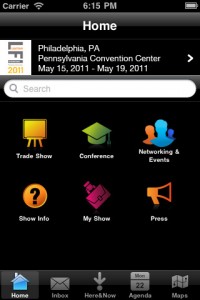 LightFair 2011 is less then a month away in the city of brotherly love, Philadelphia, PA.
LIGHTFAIR International (LFI) is the world’s largest annual architectural and commercial lighting trade show and conference. LFI has a proven track record of bringing top international and domestic Architectural, Design, Engineering and Lighting professionals together with exhibitors from around the world.
Lightfair has recently announced the release of their iOS app, LIGHTFAIR INT’L. Almost every larger trade show is putting out an app for their event. It make sense! You have the entire show catalog in your pocket rather than having a printed version in your bag or hands. Hey, it saves trees too!
Here is more about the app.
LIGHTFAIR INT’L is the official application of LIGHTFAIR® International (LFI). Use this tool to navigate the show floor, search the exhibitor directory, view networking events, create your own show agenda and review the Conference schedule.
Lightfair 2011 runs from May 15th to May 19th at the Philadelphia Convention Center. Learn more about Lightfair at their website www.lightfair.com. Visit the iTunes App Store to download the LIGHTFAIR INT’L app for FREE.
New iOS App: Truck Loader
 There is a new and different type of entertainment industry iOS app out there, the Truck Loader app. If you have ever worked a dock for a touring show, you know that packing a truck is an art form all it’s own. A correctly packed truck not only ensures that the equipment doesn’t roll around and break, but also can require less trucks on the road.
Truck Loader is a powerful app used for keeping all of your live event gear organized on the truck every night. Anyone who loads hundreds of cases every night knows how frustrating it can be when cases come into the truck in the wrong order. Truck Loader eliminates that problem. Right there in your pocket, your truck pack is ready whenever you need it at a moment’s notice.
Trucks are organized alphabetically and Road Cases are organized by Row number. Tap on the truck name, and there they are: all your Road Cases listed in order by Row and Layer. You can edit the names of the trucks and Road Cases to your liking and then edit the Row and Layer by numbers or letters or combination of numbers and letters for each case. So when load-out comes your cases will end up in the same place each and every night, right where they belong.
The Truck Loader app is a 99 cent app available from the iTunes App Store. You can learn more about the app by visiting the developers website at www.redtrusssoftware.com.
New iOS App: QuickConfig by Philips Color Kinetics
 If your installation has a running KiNET, Philips Color Kinetics just made your life a whole lot better. Introducing QuickConfig for iOS. Available for free from the Apple iTunes Store, QuickConfig is a utility that turns your iDevice into a remote programming station for all connected power supplies. Just add a wifi access point (configured to the network, of course) to your KiNET and the app should automatically populate all available power supplies or network devices.
Using their intuitive menu structure, you can see each power supply, attached devices, and their status. You can assign DMX addresses, update device ip addresses, change universes, and even test channels.
Thank you Philips Color Kinetics for an excellent addition to the iOS tool bag. Download your copy today.
New iOS App: Coolux Widget Designer Remote
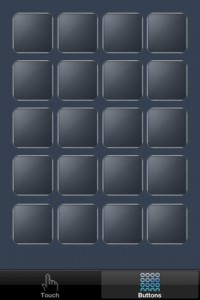 Widget Designer Remote sends TCP or UDP commands as well as touch data to Widget Designer on your Wifi network. 20 customized buttons can be set up to send Widget Designer scripts. A multitouch panel allows to send mouse and multitouch data as well. Widget Designer Remote can also send the accelerometer data for further node processing.
Features:
single and dual touch input
20 buttons with customizable scripts
TCP or UDP connection setup
Setup:
To connect to Widget Designer simply enable the iPhone Remote settings by signing the desired TCP or UDP protocol and port. The network connection and button script can be setup in the App’s settings on your iPhone.
The Coolux Widget Designer Remote is a universal app that runs natively on both the iPhone/iPod Touch and the iPad. You can pick up a FREE copy of the app by visiting the iTunes App Store.
New iOS App: Barbizon Electrician’s Handbook
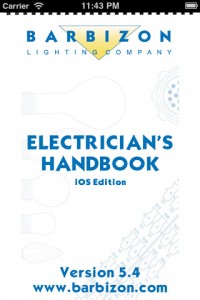 If you have been to a tradeshow or Barbizon event in the past four years, you most likely have picked up some version of the Barbizon Electrician’s Handbook. I still have ALL of mine starting with version 1!
The Electrician’s Handbook is a hand reference tool for all sorts of things that we need in our jobs. From standard electrical calculations, to socket types, lamp bases and even the perfect beer temperature!
Barbizon has teamed up with Useful Development, the developers that brought us the USITT iOS app, to bring the Electrician’s Handbook into our favorite little devices that run iOS.
Features of the app:
- Handbook Indexed Navigation!
- References for Electrical Terms, Wire and Cable, Lighting Fixtures, Lamps, Color, Patterns, Pipe, Knots, and More…
- Page to Page Navigation!
- Pinch/Zoom of Handbook pages
- Interactive Contacts for All Barbizon Office locations, worldwide!
- Barbizon Torch!
To get the new Barbizon app, head over to the iTunes app Store and pick up your FREE copy of the app.