Zinman Co Announces IYBP Viewer – Loops for Media Servers iOS App
 So there I was sitting next to my good friend Michael Zinman, the developer of so many popular lighting apps, at the Phone it in Session at LDI. I am waiting for me turn to say a little bit about the iSquint iPhone App when Michael just causally announces to everyone, “Hey, I have a new app coming out!”
My jaw dropped. After eight iPhone apps, Zinman Co is releasing another app! It isn’t a “Lighting App”, but yet an app for the entertainment production, media server and video worlds.
“In Your Back Pocket”, is a collection of 400 HD loops for LED screens, digital lighting and HD projection; pre-rendered for MAC and PC based media servers. “It’s not a replacement to your existing library, but a resource in your back pocket when you can’t find “that” clip in your existing library,” explains developer Michael S. Zinman.
“We designed every clip to be easily keyed, tiled and colorized painlessly, we’ve also rendered many of these clips to play at a slower speed, as most media servers do a better job speeding clips up,” says Michael Zinman. “Everything about In Your back Pocket will make sense to programmers. To our knowledge, this is the only collection of royalty-free loops that have been designed specifically for media servers, and the programmers who operate them.” All loops are categorized into 14 file folders, sorted by color; making it efficient to scroll through content by following along with the lighting designers color schemes.
In Your back Pocket has pre-rendered the clips in either MAC or PC format so they just have to be ingested into a media server, saving hours of work. The original source files created in Adobe® AfterEffects® are provided for users that want to customize their loops, easily adding their own design styles. Users can modify or re-render any of these projects.
A companion iPhone/iPod touch viewer application is available free on the iTunes App Store. “As a designer in the truck or a programmer looking for a great clip, In Your Back Pocket Viewer is a very efficient way to browse this library, or collaborate with the rest of the design team.” says Michael Zinman.
Media programmers and vendors interested in In Your Back Pocket can download fully rendered sample files from www.loopsformediaservers.com to test with their systems before ordering. Users can download the free iPhone app, IYBP Viewer, from Zinman Software online at www.zinmansoftware.com or directly from the iTunes App Store. For more information, please visit Loops For Media Servers online at www.loopsformediaservers.com.
[nggallery id=78]
FocusTrack’s New ‘Paperwork to Go’ Functionality
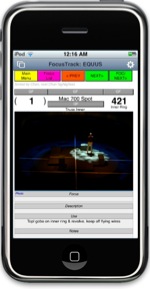 Paperwork is increasingly not ‘paperwork’ but virtual paperwork carried on laptops – until actually working in the theatre when real paper printouts have often been the most convenient way to access show information while walking around the stage focusing the rig.
Now FocusTrack, the production lighting documentation system, offers Paperwork To Go – keep your paperwork in electronic form, and carry it with you on your iPad, iPhone or iPod Touch.
With the purchase of one low-priced enabler app ($19.99 for iPhone/iPod, $39.99 for iPad), any of the FocusTrack data files – FocusTrack, containing information about the positions used by the moving lights in the rig, RigTrack, containing all of the information about the rig as a whole and the focus of conventional lights, and Cue List, containing the show cue data from the lighting console, along with all of the focus and cue reference photographs, can be transferred to any of Apple’s portable devices, referred to or edited while on the go, then returned to a main computer – Mac or PC.
“Apple has done a remarkable job of making the portable paperwork tools lighting people have been waiting for – lightweight, easy to carry, long battery life and much easier than paper to read in the dark!” notes FocusTrack’s Rob Halliday. “We’re delighted that FocusTrack can now complete the equation, letting you easily take all of the information about your rig, your moving light focuses and your cues with you wherever you are in the theatre. We think it will be the perfect choice for those moving around the stage re-focusing conventional lights, or for rep rigs where multiple electricians work to re-focus the rig between shows and will now be able to carry accurate, up-to-date focus information with them – even in their pocket if using an iPhone or iPod Touch.”
FocusTrack is the solution for those looking to produce complete, accurate, comprehensive show lighting documentation. FocusTrack can import show information from ETC Eos, MA grandMA and Strand 300/500-series consoles, automatically working out which moving lights are used in which positions, which colours or gobos are actually used, which lights have never been turned on and more. FocusTrack can import the complete patch from the console or other sources including Lightwright, and imports the show cue list from the console. FocusTrack is already in use on a range of shows, including the new US tours of Nine To Five, Spring Awakening and Hair, Billy Elliot worldwide, The Addams Family in New York and more.
Further information about FocusTrack and its Paperwork To Go functionality for iPhone, iPad and iPod Touch is available online at www.focustrack.co.uk.
iGlo LED Set
 First there was rope light. Its incandescent glow adorned many a stage as running lights (and dorm rooms). Over time it would lose its intensity and saturation and you would find sections dead for no reason.
Then came the LED rope light. It was beautiful. The colors so crisp, the intensity popped. But unless you were willing to shell out big money, you were stuck with a single color non-dimmable rope light. If you were willing to spend the money it required a hard wired proprietary controller that didn’t easily, if at all, work with DMX.
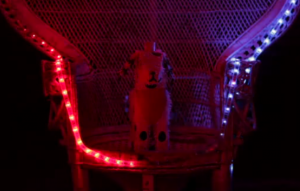
Now comes the iGlo LED set. Each rope is 5 meters (16.4ish feet) of 120 tri-color LEDs that are controllable over any Wi-fi network by a web based interface or a free iPhone app. The software looks fairly intuitive and comes with some pre-programmed sequences or you can build your own in real time. When I tried to test the iPhone app it required that the hardware be connected, so I can’t verify if you can save a sequence or not.
It’s not cheap at $299 for a full set and $199 for each additional section. But if you want to throw a swanky party or a performance art piece where people have the ability to control the show, this might be a good option.
So I’m curious, what would you use it for?
Fixture Tester App for iOS Devices Available in iTunes App Store
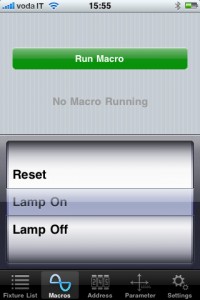
iOS app developer Bart van Stiphout has been a busy cat lately! First he releases the FocusRemote app and now the Fixture Tester App. The Fixture Tester iPhone OS is an application to test all the fixtures on the network in 4 steps:
1 Patch – Make a patch (or import a patch from ELC’s dmXLAN) and select all the fixtures you need to test, one type of fixture at a time.
2 Macro – Run a macro (For instance Lamp Strike)
3 Address Test – Press start. All the selected fixtures will go to their home position, one by one. In this way you easily can detect faulty dmx addresses. The correct address and universe is displayed for the current fixture and there are buttons present for pausing and stopping the test, as well as next and previous (when Paused).
4 Parameter Test – All selected fixtures go to their home position. When the test is started, all parameters will be run one by one to their maximum and back. The speed is adjustable. There are options to skip, adjust and repeat a parameter. The window shows the current tested parameter and its value. Again there is the possibility to pause or stop the test. An option “limit” can be set in de library to limit the maximum value for a parameter (Martin uses a combined shutter / control channel and you don’t want your fixture to reset while testing etc.).
Features:
- Unlimited number of fixtures
- Fixture Groups
- Shake to deselect all fixtures
- Warning if you are not connected to a WiFi network
- Includes an extended fixture library
- Available for iPhone, iPod Touch & iPad
- With the FileUploader App, dmXLAN patchfiles and custom fixture libraries can be downloaded in the iPhone/iPod Touch/iPad
- Testing is almost automatic
The Fixture Tester App is designed to work on both the iPhone/iPod Touch and the iPad natively. You can pick up a copy of the app through the iTunes App Store for $24.99 USD.
New iPhone/iPad App – FocusRemote Art-Net Contoller
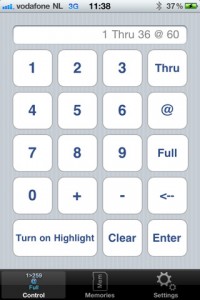
A new lighting app has hit the iTunes App Store, FocusRemote. Developed by Bart van Stiphout, the FocusRemote app is designed to do exactly as the name of the app says, focus lights remotely from our iOS devices.
FocusRemote uses the WiFi connection of your iOS device to connect to a wireless access point connected to your lighting network. The app send Art-Net signal via WiFi directly to your Art-Net capable system or to an Art-Net node that can input DMX signal into your rig.
FocusRemote has the ability to send a complete universe of Art-net over the network to bring address to a level for checking and focusing. Only one universe is selectable at a time, but you have the ability to select from all 255 Art-Net universes right in the app.
FocusRemote handles channel/address selection a little differently then some of the other Art-Net controller apps on the market as it uses a command line syntax which is typically found of lighting desk. The app also has the ability to record memories or cues for quick recall, but lacks the ability to execute on timing.
I have had a chance to play a little bit with the app and feel that there are some things missing like the cue timing, but you have to remember the name of the app FocusRemote. The app is designed to aid and help when focusing a plot and not run a show, that is what your lighting desk is for.
As for the price tag of $11.99, is it worth it, it really depends on your situation. If you are looking for a remote focus device that fits in your pocket and has the ability to work with any lighting network out there, then FocusRemote would be right up your alley. $11.99 is a small price to pay for a Remote Focus Unit that is universal and works on your iOS device that you probably already own.
You can download the RemoteFocus app from the iTunes App Store for $11.99.
[nggallery id=68]
ETC Releases iRFR Preview iPhone/iPad App
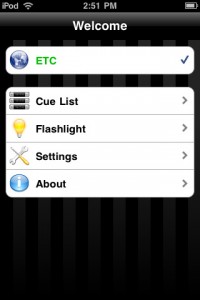 Check it out, ETC has a NEW iPhone/iPad/iPod Touch app, the iRFR Preview App! The Preview iRFR application for the Eos family of products – Eos, Ion and Element – provides a view-only Cue List display of the active cue list. Ideal for lighting designers and stage managers who need to only see current and pending cues, this application works on the iPhone, iPad Touch and iPad products. On the iPad, this application makes it possible for designers to take notes on cues, copy those notes to a text file and email them as needed.
iRFR Preview Features:
- iRFR Preview is playback monitoring only – there are no console control features in the software.
- Follow the cue list – Preview will allow you to monitor the cue playback status live. You will see the cue number, the label, and the time remaining as the cue counts down. Follow the fade in real time.
- See the current cue, as well as 3 pending cues and 3 completed cues.
- Page up and down through the cue list. Single button touch to return to Live cue on stage.
- Navigate to any cue list using the [list][/][cue] syntax.
- Store console connection profiles, just like in regular iRFR and with the same credentials.
- On iPad, touch the cue and type notes. These are aggregated in a separate viewing area, and can be copied to the clipboard for easy pasting in word processors or email.
What are you waiting for… if own or operate an ETC Eos family console, head over to the iTunes App Store on your iOS device and download a copy of the iRFR Preview app FOR FREE! Also, you might want to check out the ETC WIKI page on how to setup an access point with your ETC console, as well as how to connect the iRFR app to the console.
[nggallery id=69]
#LDI2010: Don’t Have An iPhone – LDIMobile Still Has You Covered
 All of us iPhone/iPad/iPod Touch owners should feel a little special. Live Design and LDI created the LDIMobie app. The app is designed to help navigate us through the show and keep track of our schedule. But what about our friends that don’t have an iOS device?
Live Design and LDI have you Android, Palm and CrackBerry users covered. Visit http://m.core-apps.com/ldi2010. When you visit the link, it will take you to the mobile version or web based version of the show guide. While not as functional as the iOS version, you still get the LDI newsfeed, exhibitor guide, events, and speaker guide.
Make sure to bookmark the above link on your mobile device while in Las Vegas in a couple of weeks. I applaud Live Design and LDI for saving even more trees by not having to print as many show guides and making it even easier for us attendees to navigate the show all off our mobile devices.
#LDI2010: Live Design Releases LDI Show App for iPhone
 If you have been to a trade show in the past year, you may have seen that event organizers are developing apps for our portable devices to guide us through the trade show.
I applaud trade show organizers for developing and producing these types of apps. In the old days, pre-iPhones and smart portable devices, we attendees relied on a printed playbill if you will to organize our time at the show. The down side was that these trade show guides were not available until you arrived at the trade show and registered. Yes, if you pre-registered, you may have received it in the mail early or planned your sessions and printed out a trade show floor map from the web, but you had to remember to pack it and bring it to the show.
Now with a trade show app, all of that information is right there in our portable devices that we carry around with us all the time. So the information is just a couple of finger points away. The other huge advantage here, less printing and less paper being used to print trade show guides! And of course, we don’t have to carry that huge book or wade of papers around with us while on the floor.
LDI is right there with all the other trade shows. LDI recently announced that they will be launching their own trade show app for the LDI Show coming up in October.
Good news, the app just hit the iTunes App Store for the iPhone, iPad and iPod Touch! Perfect timing too. This gives everyone plenty of time to organize the app with the sessions in the My Schedule section, Star the exhibitors you want to make sure to visit and keep up with the latest news about the show.
Fire up iTunes and download the FREE LDI App and start organizing your schedule while in Las Vegas next month.
i-Pix to introduce 6 New Products at PLASA 2010
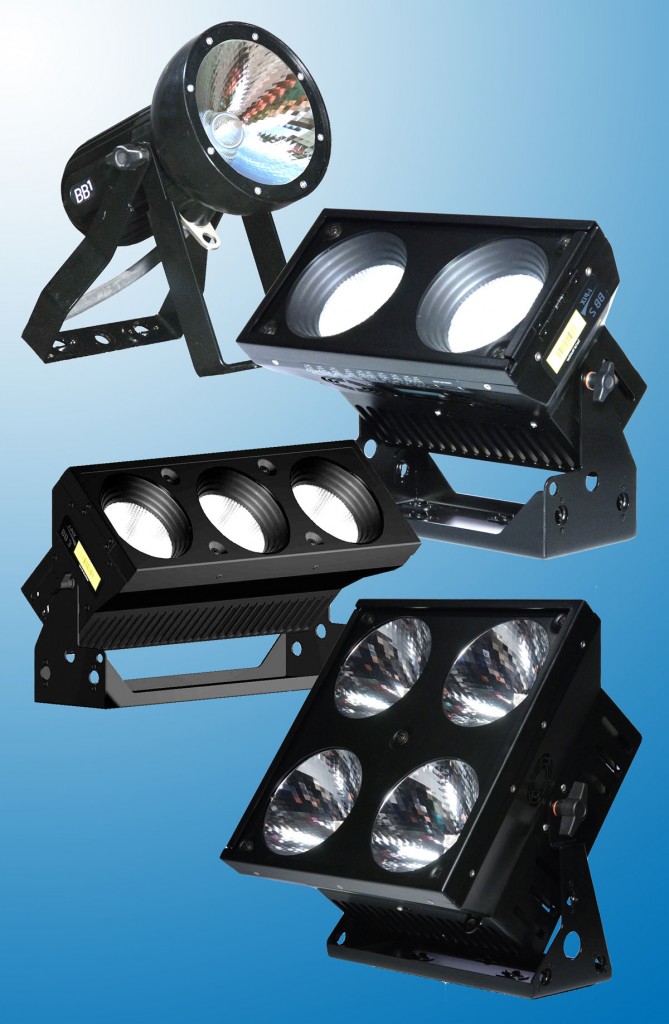
UK based specialist LED lighting manufacturer i-Pix shows 6 new products in its groundbreaking BB (Building Block) range at next week’s PLASA exhibition at Earls Court Exhibition Centre, London.
BB1 Narrow Beam
This is a single pixel fixture, designed for outdoor and submersible use. It is an RDM device requiring just 15 Volts, and can be fitted to a range of i-Pix Power Boxes and Power Bars for even greater flexibility. Full power is 30 Watts at 240 v.
The BB1 offers completely homogenised optics for the smoothest of output and is available in 20, 35 and 45 degree beam angles. It’s powerful custom RGB LED light engine has incredible colour mixing capabilities including the effortless sourcing of tungsten and daylight colour temperatures.
BB2
This is a mega-bright entry level two pixel fixture with a choice of four interchangeable beam angles, and Camloc mounts – as with the other fixtures – for easy rigging or floor mounting. On full power it draws a mere 0.25 amps at 240 volts, so is ideal for situations where the power supply is limited.
BB2x2
The BB 2×2 is a square four cell self-contained fixture with removable fronts for the option of mixing up the optical systems. The choice of quick-change optics includes the same 10 degree optic that has been so popular with the BB7 and the 20 degree optic as used in the BB4, plus two additional beam angles of 35 and 45 degrees. There is also a choice of 5 different high brightness light engines for even greater flexibility.
BB3
This 3 pixel fixture shares the same choice of four beam angles – 10°, 20°, 35° and 45° complimenting the other fixtures in the BB range perfectly and sharing the same rigging accessories. On full power it consumes 0.5 Amps at 240 volts.
4 Way & 6 Way Power Bars
The RDM DMX power bars come in two sizes – 4 or 6 way – with either standard disconnect or a hardwired model – to which are fitted the new BB1 fixtures. At full power the 4 way draws 0.5 amps and the six way 0.75 amps at 240 volts.
These are ideal for all types of portable applications from film & TV shoots and location work to small stages live concerts and performances, site-specific theatre, exhibitions and conferences or education establishments where safety is paramount due to the low heat levels.
The Power Bar provides low voltage to the BB1 and is equipped with an onboard user interface. This allows each fixture to be individually addressed and the ‘operating’ mode to be adjusted. Both power and data are fed neatly through a combined data/LV power cable.
The user interface will receive and transmit either 8 or 16 bit DMX to the fixtures, and will run in stand-alone mode – whereby up to 20 memories can be stored, and a chase created from these.
The Power Bar is fitted with Camloc mounts for connecting to Omega brackets, to facilitate quick and easy rig or boom rigging. As well as these suspension points, there is a centrally located spigot position for rigging onto stands of all types.
Across the range :
All these new BB fixtures feature i-Pix renowned homogenised optical system. Five new high intensity light engines – standard RGB, enhanced RGB (40% brighter), Warm White, Daylight White and Tuneable White – are available across the entire range.
Future proofed 2nd generation 16 bit electronics and software architecture deliver exceptionally smooth fades, whilst the strobing function has been enhanced with a strobe sync function between each pixel, for more dramatic strobe. The choice of operating modes includes Stand Alone or DMX/RDM DMX, with a quick setup via the onboard user interface.
Combined power and data connection system for quick cable hook up, with IP rated protection and daisy chaining capability – greatly simplifying cable hook up. The BB range is designed and engineered to work in the harshest of touring environments, with quick rig Camlocks and a choice of rigging accessories facilitating tool free setup.
Also new at PLASA …..
A new asymmetric optical accessory for the popular i-Pix BB4 gives an exceptionally even cyc and set wash for up to 8 metres coverage, without any hotspot banding, when lit from the top or the bottom. A new weatherproofing accessory is available for the BB 7 – this distinctive and attractively shaped fixture is very popular for festivals and outdoor events, so with this additional protection outdoor illumination is easier to achieve.
i-Pix is also previewing their new data-over-mains technology, which will be demonstrated at the exhibition with a BB2 together with an iPhone app, for remote controlling all fixtures in the BB range.
PRG Adds iView ArtNet iPhone & iPad App to iTunes Store
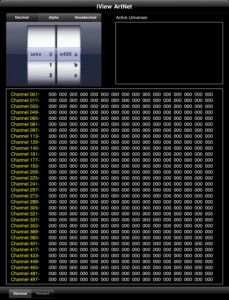 iView ArtNet allows you to view channel levels for Art-Net data that is present on a Wi-Fi network. Note: a Wi-Fi connection is required for this app to work.
Active Art-Net universes present on the current Wi-Fi connection are displayed in a list. The universe to be viewed can be selected using decimal, hexadecimal, or alphabetical notation. Additionally you can select the System ID for a PRG Series 400 distribution system (always select System A if not using a Series 400 system). Channel level values can be displayed in decimal or percent format.
iView Art-Net will receive either broadcast or unicast data, but does not respond to ArtPolls. You must manually configure your transmitting device, wireless access point, and iPhone/iPad to ensure proper communication.
What are you waiting for, add iView ArtNet to your iPhone, iPod Touch, iPad NOW! It is a totally FREE APP in the iTunes App store, go grab it now.
High Resolution System Announces Web Based Universal Device Controller – UDC-400
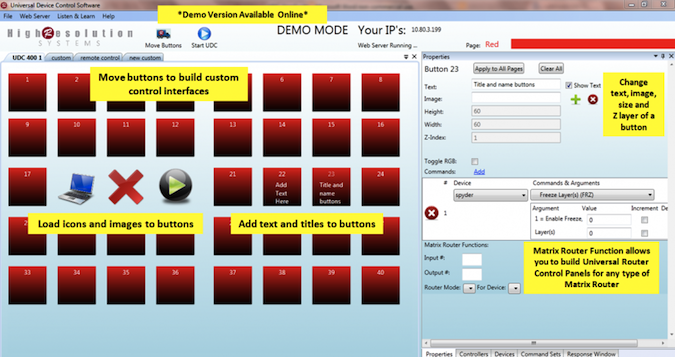
Want to control a number of things over the web? Take a look at the High Resolution Systems UDC-400 3.0. It is a software based Universal Device Controller that send signals to any device has an IP address. Commands can be sent or Art-Net or serial protocols. You can also build protocol translation tables to allow devices without common languages to communicate. (Ex: PBUS translation to any other protocol).
The software is geared towards staging, rentals, broadcast, House of Worship, almost any place that requires execution of commands across a complex network of protocols. What is nice about the software is that it has a web interface. Anyone with a network connection to the server can log in and access the controller. It even works on the iPhone, iPod Touch, iPad and Android portable devices. In fact, any portable device with a web browser can access the controller.
Here is a quick overview of how the system functions from High Resolution Systems.
To learn more about the High Resolution Systems Universal Device Controller, head over to their website at www.highresolutionsystems.com.
iPhone App: Color Kinetics LSM Remote
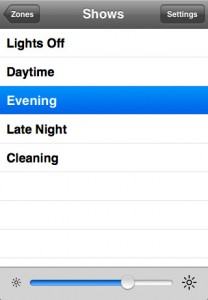 I am a little late to the table with this one. Back in April, Philips Color Kinetics released a new iPhone app into the iTunes store, the LSM Remote. The LSM Remote App is used to control Philips Color Kinetics Light System Engine on your iPhone/iPod Touch/iPad.
Simply add a wifi access point to the network on which Light System Engine is installed, and LSM Remote can control all of your shows remotely. For each zone programmed on the LSE you can select which show to play, adjust its brightness, or turn off its lights. Additionally, you can specify a show transition type and time.
This has a WIDE range of uses. Practical for live performances? Maybe not, but the architectural possibilities are endless. Learn more about the LSM Remote from Philips Color Kinetics website, www.colorkinetics.com. You can download the LSM Remote for FREE from the iTunes App Store. But in order for it to work correctly, you need some more pieces to the puzzle.