ChamSys Releases MagicQ Remote App for iPhone
Back on May 21st, ChamSys released their MagicQ Remote iPhone App in the iTunes App store. Just like almost all of the other remote apps out there for lighting consoles, the MagicQ Remote App connects to the MagicQ console via WiFi. The app offers the ability to control and run lights from the iPhone. While the remote app does work on the iPad, it is not a native iPad app. On the iPad, the app “magnified” like other iPhone apps to make use of the larger display on the iPad.
The MagicQ Remote App is a FREE download from the iTunes app store. To learn more about the MagicQ line up of consoles, visit ChamSys web site at www.chamsys.co.uk.
[nggallery id=52]
West Side Systems Updates DMXCalc App for iPad
 That is correct, West Side Systems is leading the pack on native lighting apps on the iPad. West Side Systems just announced the release of the iPad update to their DMXCalc app in iTunes. The iPad version of the app combines the address calculator, DIP switches, DMX level reference, and a new block addressing display on one screen. The new Blocks page, on both iPhone and iPad, is a huge help when addressing a sequence of moving lights, dimmer packs, or other devices. Loaded with a start address and a block size, it lists all address blocks in the current universe, and can display a breakout of the local and absolute addresses for each slot in the block.
Standard features of DMXCalc include translation between local and absolute addresses in any universe; DIP switch display for setting device addresses or decoding the address of a device; and a DMX level reference listing hexadecimal, percentage, and MIDI values for all 256 DMX levels.
DMXCalc is a $ .99 download from the iTunes store. For current owners, the update is a free download. To learn more about the DMXCalc for the iPad, visit West Side Systems web site at www.westsidesystems.com. Here are a couple screen shot of DMXCalc running on my iPad in my favorite orientation, landscape.
[nggallery id=48]
West Side Systems First with iPad Lighting App – BeamCalc Updated
 The race for the first iPad lighting App has been won. Let me re-phrase that, the first iPad lighting app TO MARKET, has been won. I have heard about a bunch of great idea’s for iPad apps as well as seeing a couple of neat beta’s.
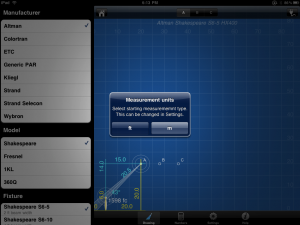
West Side System’s is the first to bring a native iPad Lighting App to the iTunes App store with an update to their BeamCalc App. BeamCalc has been updated to version 2.2.1 for both the iPhone/iPod Touch and the ipad. The major news with the update is that is runs on the iPad nativity along with 40 additional fixture types, positioning the light source by entering the throw distance for quick calculations, selecting a light by simply tapping the source or target and improved drawing page data display.
More about the iPad version… HOLY MOLEY BATMAN, it is gorgeous! The iPad version takes full use of the larger display. Very similar to the mail app on the iPad, there is a menu system off the the left that you can quickly change you light source from a different manufacture, fixture type and lamp size. All of the calculations are updated quickly and displayed on the cross section.
The app runs $14.99 for either the iPhone/iPod Touch and ipad. The update is free for current users. But is the app worth the money for a new user… I would have to vote yea. Check out some of the screen shots I took of the app running on the iPad, just awesome! Excellent work West Side!
[nggallery id=47]
Entertainment in Production Books Available as e-Books
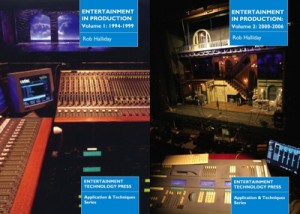 I just heard from my good friend and fellow console connoisseur, Rob Halliday that his books, Entertainment In Production, Volume 1 & 2 have been made available as e-books through Amazon.
While I am all about getting the books as e-books, I am still a little miffed that they are only available for the Kindle e-book reader from Amazon. While there is a Kindle App for the iPhone and the iPad, I would love to see the books as native e-books for the iBook app on the iPad. But progress is progress and I can still read/carry them in my iPad.
Here is more information about the e-books from the Press Release:
Writer and lighting programmer & designer Rob Halliday’s books Entertainment In Production vols 1 and 2 are now available to those who prefer their reading in electronic form, through Amazon’s Kindle Store. This means that the books are available not only to readers using Amazon’s Kindle, but also to those using the Kindle software on Apple’s iPad and iPhone, on Blackberries, and on PCs and Macs.
The two Entertainment In Production books gather together more than a decade’s worth of coverage of the creation of some of the world’s most spectacular entertainment projects. The first, covering the period from 1994-1999 includes shows such as Cirque du Soleil’s Mystère and O, the hit musicals Tommy and Mamma Mia, events including the spectacular design for the 71st Academy Awards and the 1996 US Presidential Election Conventions, the reconstruction of London’s Lyceum Theatre and the creation of Las Vegas’ spectacular Fremont Street Experience.
The second book, which covers the period from 2000-2006, includes such shows as the musicals Aida, Chitty Chitty Bang Bang, Fosse, The Woman in White and Mary Poppins, Baz Luhrmann’s Broadway production of La Bohème, Cirque du Soleil’s stunning KÀ, the remarkable Lake of Dreams at the Wynn Hotel in Las Vegas, plus New York’s Tribute in Light.
The articles include insights from many of those involved in these shows, many of which were landmarks in entertainment design and technology; designers whose work features in the books include Acme Sound Partners, Francois Bergeron, Ken Billington, Andrew Bridge, Andrew Bruce, Bob Crowley, Jonathan Deans, Bob Dickinson, Michel Crete, William Dudley, Rick Fisher, Paul Groothuis, Wendall Harrington, Mark Henderson, Howard Harrison, David Hersey, Natasha Katz, Luc Lafortune, Nigel Levings, Matt McKenzie, Anne Militello, Tony Meola, John Napier, Nick Ormerod, Chris Parry, Kenneth Posner, Paul Pyant, Mike Walker, Anthony Ward, Patrick Woodroffe and many more. Rob Halliday was directly involved in the creation of a number of the featured productions, giving a unique insiders view from behind the scenes on these shows.
For more information of the books, visit the dedicated web site at www.entertainmentinproduction.com. You can purchase the e-books from the Amazon.com bookstore for $15.95 each.
Zero 88 ZerOS iPhone App Released in iTunes
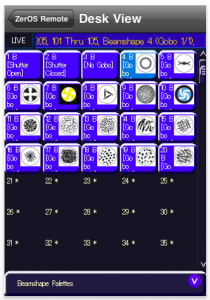 Back at USITT, Peter Kirkup let me in on a little secret about Zero 88’s newest “product”, the ZerOS iPhone app. Three weeks later, Apple has approved the app for release in the iTunes app store. The ZerOS Remote App is just what you think it is. It is a remote focus/console unit that runs on your iPhone, iPod Touch or iPad. The ZerOS App connects to the Zero 88 line of consoles, the Leap Frog 48, Leap Frog 96, Frog 2 and ORB consoles all over WiFi.
From the ZerOS Remote App, you can manipulate, control, and play back shows right from my favorite handheld device. From the screen shots provided on the iTunes store, it looks like you can select fixtures via the keypad, control their parameters such as Focus, Color and Beam. That is if you select a fixture that has those parameters available!
You can also bring up your pallets for those multi-parameter devices and quickly recall the pallets all right from the remote. The screen shot of the color picker looks pretty amazing as well.
Have a Zero 88 consoles? How about a wireless router or access point? For $9.99 you have a wireless remote for your Zero 88 console. Visit the iTunes store to check out some of the screen shots of the ZerOS Remote App and to purchase your copy.
Thanks Peter for the heads up and the review copy to play with!
Xtreme Structures Introduces iTruss iPhone App
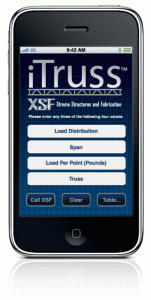 Xtreme Structures just announced the release of their latest “product”, the iTruss iPhone App. I have to say, I am quite disappointed in this app right off the get go. It was a $4.99 app through the iTunes app store. Of course I bought it, I wanted to check it out for you.
Let me start with I have never heard of Xtreme Structures or their line of truss. Not a huge deal breaker, but none the less, an unknown one to me. After reading the description of the app in iTunes, I expected it to be similar to the iRigging app from JR Clancy. Meaning that a professional company put together a calculator form general specifications and would be universal measurements across all types of truss.
Do not, I repeat, do not make the same mistake I did with iTruss. The iPhone app is at best a “catalog” for Xtreme Structures trussing product line. Yes, it does offer the ability to do some calculations to find the best truss from Xtreme Structures, but there is no cross reference guide or anything for other truss manufacturers. I would not be so upset about Xtreme Structures leaving the other manufactures out of the app is the app was free or even .99. But come on 4.99 for the app that only deals with just their product line?
All that being said, I think the app is very nicely laid out and applaud Xtreme Structures work on the app, it looks and functions very nicely. I have hopes of Xtreme Structures updating the app with new features and other manufacturers, but time will tell.
You can download the iTruss iPhone app from the iTunes app store, but again, it is a $4.99 download. You can learn more about the iTruss App by visiting the apps web site at www.itrussapp.com.
iPad Unboxing and First Impressions
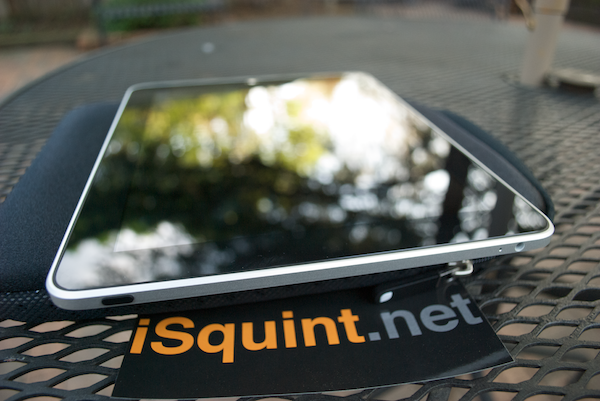 This week was all about USITT in Kansas City for the annual Conference and Stage Expo. This weekend is dedicated to Apples latest product, the iPad. My original plan was to pick up an iPad in KC before my flight left on Saturday, yeah, that was a poor plan as the Apple store in KC didn’t open until 10am and my flight left at 10:30.
So after getting into DC about 3:45, my first mission was to of course hug and kiss the wife, then off to my favorite Apple store, Clarendon. With only one person in line ahead of me, it gave me a chance to talk to some of the other excited people in line behind me waiting in the queue for their own iPad. The gent behind me was just excited about the iPad and the possibilities that the iPad can do for him. Apple geeks unite you might say. He is a web design looking for a way to quickly and easily show his clients design ideas and carry his portfolio around. I of course mentioned Zinman Softwares Portfolio App to him to show off his work.
I was next, my heart pounding in total excitement about being a part of the iPad revolution. Picking out my choice of the iPad was easy, the 32gig version, not too big,not too small, as Goldilock says, “it’s just right.” I was in and out of the Apple store pretty quick, less the ten minutes. As I was leaving I had a HUGE smile going and gave high fives to other early adapters and Apple employee’s, it was exciting times! I am still surprised I didn’t get a speeding ticket as I was racing home to unbox the iPad and get her up and running.
As you can tell from the photos below, the packaging is very compact as with all of Apple’s product package of late in order to help reduce waste and going green. The box contained the iPad of course, a new power supply, cable, a quick reference guide and of course, some Apple stickers! One thing I am wising that Apple included with the iPad was the cleaning rag like they did back when I purchased my 1st gen iPhone.
Since the iPad can be described as a larger iPod touch, it functions just like it thus requiring it to be connected to iTunes first for registration and hookup. After updating iTunes to the latest version and some other software updates that I have been meaning to do, my iPad was ready to play. I transferred all of my apps from my iPhone, some music, a couple of tv shows and a movie or two and I was ready to go. I don’t remember breathing when it was time to launch her for the first time.
The first order of business, get the iBook app! It was a free download from the iTunes app store right on the iPad. Why is it not included with the iPad right out of the box, i have no idea, but hey, it was free! Then there was finding some of the other apps that I use on a regular bases that have been ported to the iPad. Such as this, the WordPress iPad app that I am writing this post in.
Moving around and using the iPad is very comfortable. It came naturally since I was an early adapter of the iPhone and have been using it for three years. Since it has a larger screen, typing on it is even better. Since I use the smaller Apple keyboard for typing on my MacPro, I am use to using a smaller keyboard so typing with two hands on the iPad in portrait is extremely easy.
I’m excited to learn more about the uses of the iPad and how it will change my work flow not only here on iSquint, but in my day to day life. Some have questioned my judgements in getting an iPad with only WiFi and not waiting for the 3G version that is coming in a month. Recently I upgraded my sprint mobile broadband card from a USB stick for my MacBook to a Sprint 4G MiFi Access point. This was all in preparation of the iPad coming out. Rather then paying once for broadband access to my MacBook and then another service for just my iPad, I can connect both devices to the MiFi and be connected where ever I might be. Thus saving some money and hey, I get an iPad on iPad Day!
I am still testing, (more like playing), with some of the features of the iPad and how the iPhone lighting apps look and feel on this larger screen. Look for more about the iPad and what our lighting apps will look and feel like here on iSquint.
OH, One of the exciting yet smaller things that really makes my day is my new signature to my emails from the iPad.
Sent from my iPad
[nggallery id=39]
JR Clancy’s Updates iRigging iPhone App
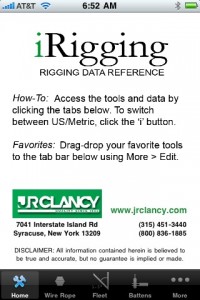 Looks like JR Clancy just updated their iPhone app, iRigging. The first noticeable difference is the lacking of the Metric version of the App. When JR Clancy first released their iRigging app, they had two versions, one for Metric conversion and one for imperial conversion.
Well, with the new update to iRigging, JR Clancy combined the two version into one. So rather then having to choose or switch between the two version of the app, you can now quickly and easily change from Metric to Imperial by clicking the information i on the top right of the app.
JR Clancy also added the ability to pull your favorite or most used portions of the app down to the black bar at the bottom of the app for quick reference. You can still access all of the other conversions and sections of the app under the more button on the right.
The iRigging App from JR Clancy is still a FREE download from the Apple iTunes App Store. To learn more about rigging and what JR Clancy can offer you, visit their web site at www.jrclancy.com. While on their site, besure to sign up for the Rigging Report email!
Show Some iSquint Love @ #USITT50 and I’ll Show it Back

Yes, yes, yes, I can’t say it enough, USITT is right around the corner and it going to be one hecka excellent time! Well I have something special for those of you attending the Expo in Kansas City this week. You show your iSquint love, and I’ll show it right back! Umm, what does that mean?! It’s simple, At anytime during the conference and stage expo, find me and show me the iSquint app on your iPhone or iPod Touch and I’ll give you a limited edition I heart iSquint button! I do have to limit it to one button per person. One other requirement, I get to take a photo of you and the i heart iSquint button, it’s only fair right?
But what about us Droid and Crackbery users? Well, since the app is not ready for you guys as I had hoped it would be… Surprise me, think of something creative to show and tell me. We’re all theatre people, be creative!
Now for those of you who couldn’t make it to KC… Have no fear, I’ll have something for you when I get back, i promise.
#USITT iPhone App Updated Right In Time
 I just received a message from USITT’s iPhone developer, Useful Development, that a new update to the USITT app has been released to the iTunes App Store. Version 1.0.1 brings a couple of bug fixes from the previous version along with some great additions. The update brings a searchable database and listing of exhibitors at the Stage Expo along with a pretty handy map of the Expo floor.
The app is still a FREE download and FREE upgrade to current users. Before you head out the door next week for USITT in Kansas City, make sure to head over to the iTunes App Store and get/update your USITT iPhone App.
Thanks Josh!
[nggallery id=33]
#ProLight + Sound Releases iPhone App #PLS2010
 All month long I have been writing about new and exciting things that are being announced and shown at the ProLight + Sound Show in Frankfurt Germany this week. Well, it looks like ProLight + Sound has something to announce themselves!
On this, the first day of ProLight + Sound, Messe Frankfurt just released their iPhone app of the show! Seems like every trades how these days is coming out with their own iPhone app to help attendees navigate and find information about the show and I love it! The app gives attendees the ability to locate an exhibitor by searching for their name or by booth location. The app even has a Gelandeplan, or Ground Plan of the show to help navigate the large show floor.
Just like any trade show app should have, the ProLight + Sound app list events and sessions that are being offered at the show and gives the info about it and location. Find something you like or want to attend or see? Add it to your Favoriten or Favorite’s right with in the app for quick reference!
The app is a great alternative to the traditional printed trade show guide as it is one less thing to carry, plus the app is searchable. Unlike a printed trade show guide where you have to hut and search for what you are looking for.
ProLight + Sound did a fantastic job with the app and makes me wish I was at the show even more now! The app is a FREE download from all countries of the iTunes App Store. If you are at the show, be sure to head over to the App Store on your iPhone or iPod Touch and download the FREE ProLight + Sound app!
Sneak Peak: Zero 88 Prepares to Announce ZerOS Remote for iPhone
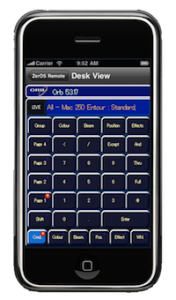
My inbox is being over run with announcements and leaks for new products that are being shown later this week at ProLight + Sound in Frankfurt Germany. It looks like Zero 88 is preparing to announce a new product, the ZerOS Remote for the iPhone and iPod Touch. Doing a quick search on the iTunes App Store, it looks like the app has not been approved yet by Apple.
No details were included with the email, but it is safe to assume that the ZerOS remote works with Zero 88 flagship console, the ORB desk and their Frog line up of consoles. As with most remote apps for lighting desk out there, I would have to venture a guess that the ZerOS Remote App connects to the lighting desk via a wireless access point over WIFI.
From the screen grabs of the app, it looks like you have quite a bit of control of your lights via the app. Seems like there is a view for each screen and programming section of the console. Such as palettes, key pad, encoders and even the Frog style wheels for playback.
I am expecting to hear more about the ZerOS Remote App before ProLight + Sound starts on Wednesday. If you are attending the show, be sure to stop by Zero 88’s stand, B54 in Hall 11.0.
ZerOS Remote App Screen Shots
[nggallery id=31]