VirtualLightDesk App Added to Mac App Store
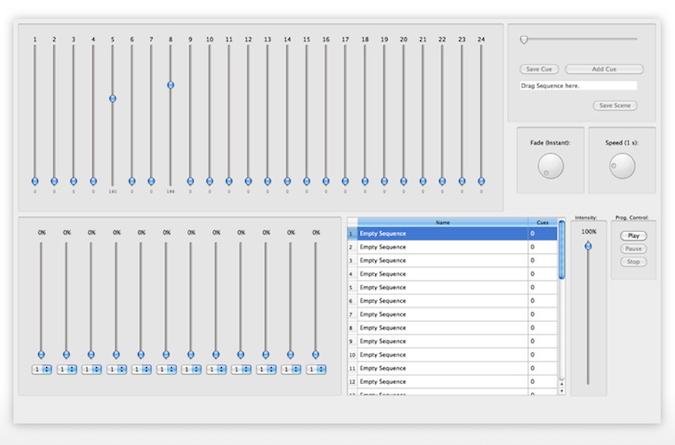
Mac Developer Thomas Günzel has the release of VirtualLightDesk app to the Mac App Store. VirtualLightDesk is a 24 channel console that runs on the Mac platform. In order to output from the software to any DMX device, you will need the Enttec Open DMX USB interface.
The VitualLightDesk app has the ability to operate 24 channels of DMX with up to 32 programmable sequences and 128 cues per each sequence. The app also features easy drag n’ drop file system or organizing your desk. The app require Mac OSX 10.6.6 and cost just $5.99 USD from the Mac App Store.
There are plans for the app to output Art-Net in future versions and updates of the software. You can learn more about VirtualLightDesk by visiting Thomas’s website at thomas.gruenzel-ag.de. I have linked the Google translated page in English.
Synthe FX Release New iPad & iPhone iOS App and LCompanion Software
Synthe FX has been hard at work these past couple of months. First updating the iPhone app of Luminair and then releasing Luminair for the iPad. Now with the release of the Mac App Store, Synthe FX has been working over time to bring even more updates to the iOS apps along with the LCompanion software for transferring and updating files for the iOS apps. Here is more from Synthe FX.
Synthe FX has announced the release of Luminair for iPad v1.2, which adds new features such as support for external MIDI control over Wi-Fi networks, as well as support for direct transfers of PDF paperwork from Cast Software’s WYSIWYG R26.
Expanding on the new external MIDI, MSC and OSC remote features recently added in v1.1, Luminair for iPad v1.2 adds the ability to use RTP MIDI over a Wi-Fi network, for wireless control from any MIDI control source connected to a Mac, PC or other compatible equipment. Luminair’s use of the CoreMIDI framework found in iOS provides low latency over a Wi-Fi network.
Version 1.2 also adds support for the latest version of Cast Software’s WYSIWYG lighting pre-visualization software, which was recently updated to R26. WYSIWYG R26 adds the ability to directly transfer PDF paperwork to Luminair running on an iPad, iPhone or iPod touch. Luminair provides a customized interface for browsing these paperwork files, making it easy for users to quickly reference important information without closing the app.
Luminair for iPhone was also recently updated to v2.2, which adds an “in-app” PDF reader, as well as the WYSIWYG PDF paperwork transfer features found in Luminair for iPad. Users can now transfer and open any PDF file in Luminair for iPhone.
Additionally, Synthe FX has announced the release of LCompanion v1.0, available in Apple’s new Mac App Store. LCompanion is a free Mac OS X app that allows Luminair users to both build and save custom fixtures profiles, as well as transfer project, fixture, image, and PDF files back and forth from a Mac to an iPad, iPhone, and iPod touch device.
Luminair for the iPad brand new is $129.99 USD. Luminair for the iPhone/iPod Touch new purchase price of $99.99 USD. Now, if you own either iOS app, the new update to either app is FREE from the iTunes App Store. You can learn more about all the new updates by visiting Synthe FX web site at www.synthe-fx.com.
DMXRef App added to Mac App Store
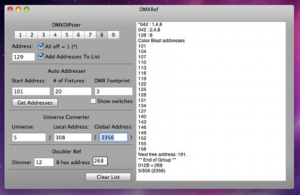 Yesterday, Apple opened up the Mac App Store. With the Launch of the new store, there are already a bunch of software titles added to the store. For us, there are already a hand full of lighting software titles available. One of them being the DMXRef app for mac.
The DMXRef software is from the same developer who brought us the iOS app, DMXRef, Michael Swan. The mac app of DMXRef is designed to take the math out of working with DMX devices so that you can get on with more important things faster. The test view on the left is where information gets added for you for saving into other documents and printing. The text view is fully editable, you can even change the font and add images to suit your needs. Once you have the information you need, you can print to paper or PDF, to quickly save your work or copy and paste it into another document to be saved as needed.
The DMXRef app for mac is available in the Mac App Store for $9.99 USD.
Apple Opens the Mac App Store
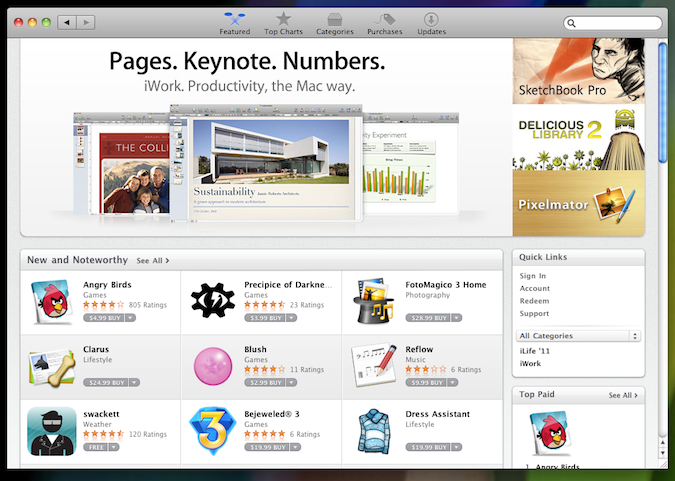
You heard the announcement back in November, here we are in January and Apple has opened up the Mac App Store! The Mac App Store is something that, for the time being, is totally separate from the Apple iTunes App Store. The Mac App Store is free download from Apple. Think of it kind of like the iTunes App Store, but for mac computer programs.
Rather then heading to a brick and mortar store like an Apple Store or your favorite electronics store to pick up new releases of mac programs, you can now purchase and download those title right from your mac. Just like the iTunes App Store for apps on our iOS devices, your Mac Store App login is attached to your Apple ID so purchases are quick and easy. Also like the iTunes App Store, you are notified in the Mac App Store of new updates to software titles that you have already purchased.
With the release of the Mac App Store, there are a couple of lighting software titles already available for our community. Just like the lunch of the iTunes App Store, we will begin to see more and more lighting industry software titles offered in the Mac App Store, just give it some time.
Getting the Mac App Store on your mac is easy as doing a software update from the apple on the menu bar. To help distinguish the difference between mac software titles and iOS apps, there are two new sections on iSquint, the iTunes App Store and the Mac App Store.
Martin Professional Releases Maxedia 4.40 Software
 The latest software release for Martin’s user-friendly Maxedia™ media server brings the Maxedia feature set to a higher level. Aligning simplicity of use with complexity of execution, Maxedia 4.40 shows how the most powerful media server on the market can also be a user-friendly one.
Highlights of Maxedia version 4.40 include:
Cuelist: Similar to lighting consoles, Maxedia now features a cuelist for automation. From simple drag and drop of cues through an intuitive user interface, cuelists are quickly built and ready to play back. Cuelists can be triggered manually, automatically using Wait and Follow time, or even using external timecode. This makes Maxedia the perfect media server for permanent installations as well as large events.
Timecode: Complementary to the new cuelist is new timecode input. MIDI and SMPTE timecode can be used to synchronize one or multiple Maxedia systems together. Not only will Cuelist cues be triggered at the right time by following external timecode but the actual video content of cues will also follow timecode. This means that video playback is exactly where it is supposed to be when the user jumps forward or backward in the timecode.
Up to 8 HD inputs: The Maxedia engine now supports up to 8 HD SDI inputs simultaneously. Using the newly added MCC capture card, latency is kept as low as 2 frames per second, turning Maxedia into a super powerful video switcher. In addition to the high speed capture, the video input can make use of frameblending for smooth 50/60 HZ conversion, a unique feature of Maxedia. A choice of Dual HD-SDI and Dual DVI MCC capture cards is available from Martin Professional.
New Output remapper: When using several video walls and creative LED video curtains there comes a time when breaking, scaling, rotating and repositioning the engine output into sections is necessary. This task is easier than ever with the new Video Output Remapper. A portion or the entire video content can be sliced and diced anywhere on the actual video output.
More 3D warping and Keystoning possibilities: Keystoning, edge-blending and 3D warping are now available on both engines, which makes each server really act like two servers. 3D warping in combination with keystoning and edge-blending can be done over six video projectors using a single Maxedia Broadcast and up to three projectors on a Maxedia PRO and Compact. Large scale projections onto buildings have never been easier or more cost effective!
A bundle of new creative effects: A dozen new, high-quality effects and plugins have been added to Maxedia 4.40. All the new effects allow for more control and better tools for the ultimate creative mind. Included is Framing borders, Chainer, Color Motion, Sepia, Advanced Chromakey and more.
For more information and to download the new Maxedia 4.40 software, visit www.martin.com.
Visual Productions Releases Personality Builder for Cuelux
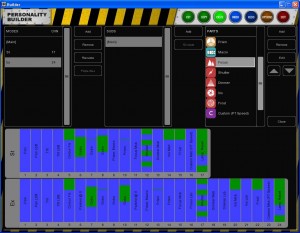
Visual Productions has released a tool for creating personality files for use within Cuelux. This tool – the ‘Builder’ – is available for Mac OS and Windows and is free for download from Visual Productions web site, www.visualproductions.nl.
The Builder offers a friendly GUI (Graphical User Interface) for creating and editing personality files. Users can amend existing fixtures or start building their own fixtures from scratch. The personality files (sometimes referred to as ‘profiles’) are visualized by a coloured diagram to indicate good data and to highlight typical mistakes when inputting the fixture’s DMX table; like overlapping channels and values. Personality files created with the Builder can be used directly by Cuelux; the Builder also features an upload function to send the newly created file to Visual Productions’ server to be included in the next software release.
With the release of the Builder application Visual Productions is still continuing its free-of-charge service to create personality files on user’s request, however, the Builder is specifically addressing situations where personalities are required outside office hours.
Give The Gift of Lightwright Touch This Holiday Season
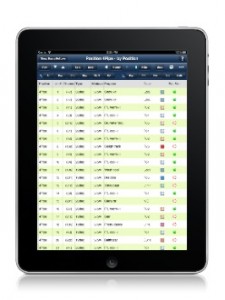 When you read that headline, did you get overly excited? I did too! You may have heard this before, like around LDI that West Side Systems, an iOS developer, has been working with John McKernon, the developer of Lightwright, to create Lightwright Touch for the iPad!
This is where you get super jazzed up…
Lightwright Touch is a companion app to Lightwright 5, and enables viewing and editing of your Lightwright worksheet on a mobile device. With your lighting data literally at your fingertips, you’ll glide through your paperwork using the Lightwright functions you know in the iPad interface you love.
How awesome right? Well, why not give your favorite lighting design/tech the gift of Lightwright Touch this holiday season? Bad news, Lightwright Touch will not be released in time…WAIT, don’t leave yet!!!
As of right now, there is an introductory price of $49.99 USD if you pre-order right now, you pay $39.99. That is a $10 USD savings over the price of the app when it hits the iTunes App Store. Lightwright Touch is expecting to hit the App store early 2011. Might be January 1, might be January 31 or even later, no one knows but West Side Systems. I do have a hint though…. Keep an eye out for an update to Lightwright 5. The release of Lightwright Touch should follow that pretty quick.
If you are giving Lightwright Touch as a gift this holiday season, West Side Systems has a present that you can give your giftee, a hi-res, 8×10 screenshot of Lightwright Touch in action. All you have to do is download it, print it and wrap it up. You LD/techie will love it!
Learn more about Lightwright Touch for the iPad by visiting West Side Systems web site, www.westsidesystems.com. To learn more about pre-ordering Lightwright Touch and saving some greens, visit www.pocketlighting.com.
Martin Releases v2 Software for P3-100
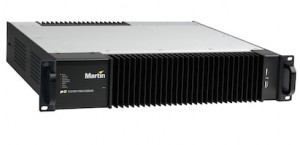 Martin Professional announces the release of V2 software for the P3-100 System Controller that puts this award-winning LED video screen processor even further ahead of the competition. Martin has added a host of new and advanced features, including an improved user interface, to make it even easier to use.
The V2 software will run on any P3-100; no need for any hardware upgrades.
Highlights of the V2 software:
- LED video screens with different pixel pitches (resolutions) can now be combined on one P3-100 System Controller. The P3-100 (V2) does all the scaling for you.
- Easily adjust the color temperature (white balance) of the screens to match them to other screens.
- Undo and redo buttons allow any changes to be easily undone or re-done.
- Now users can freely rotate the content on any video panel or group of panels to any angle, not just in steps of 90 degrees, opening up a host of creative possibilities.
- Easy-to-select groups of panels can be created for easier and faster handling of big and complex setups.
- Layout and quick-addressing wizards help to configure and set up all key parameters with a minimum of time and effort.
- Even more video-presets have been added to save and recall settings without limitations.
- A much improved (and very intuitive) DMX-control patching GUI makes for easier setup of live control from your favorite control console.
- A free-of-charge P3-100 Offline Editor allows for pre-programming of a setup/show on any standard PC.
With the P3-100 and any control console users can control fixture position, fixture rotation, intensity, color temperature, video preset recall, blackout, etc. in real-time, on a cue-by-cue basis for perfect lighting and video synchronization.
Martin has added predefined DMX control sets that match with personalities found in the major lighting consoles, including the popular new Martin M1 lighting console. And, to help users focus on the creative aspects of the show, a DMX Setup Wizard has been added to facilitate fast and easy creation of many DMX control options.
Learn more about the new software from Martin for the P3-100 by visiting their web site at www.martin.com.
Cast Software Releases WYSIWGY R26 TOMORROW, 12/15/2010
 Get your previsualization self ready. Cast Software is preparing to release WYSIWYG R26 tomorrow, December 15, 2010! If you are already a member, you can head over to the Members Only section of Cast Software’s web site and get it now!
More from Cast Software:
wysiwyg R26 is really virtually real, and this is a fact. R26 has been designed to give the user a better experience on many planes – with a heavy emphasis on Reports and Presentation.
New features in wysiwyg R26 include:
- Worksheets: Import/Export data from Excel (97,2000,2003,2007) & CSV
- Over 100 onboard spreadsheet calculations
- SmartCells: Use PRES Mode’s new SmartCells to intelligently update your show data in both Reports and Worksheets
- Dimensions: Create clear & concise plots with the new radial and arc length dimension tools
- Frames simulate motion in Six Degrees of Freedom
- Reports: Improved Reports tab makes it easier to create, customize, and maintain all of your show’s vital information; Intelligent data filtering using Boolean queries
Luminair App for iPad: A no-brainer for every production set; Download fixture POV and DMX data to your iPod and now to your iPad. Plus R26 allows the User to send Reports, Layouts and Worksheets as PDFs to the Luminaire App
R26 gives the user a solid platform of spreadsheet tools, improving the data experience for the user and improving efficiency in creating paperwork. R26 is also the international debut of some new essential dimensioning tools – radial dimensioning, arc length, and a new Protractor Tool. CAST software development has also made developments in the virtual environment, adding the ability to use the 3Dconnexion mouse for true 3D flyovers on 6 Degrees of Freedom – X, Y, Z, and Pitch, Roll, and Yaw.
wysiwyg R26 and the 3D mouse from 3DConnexion
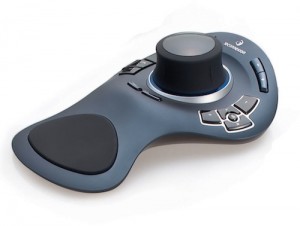 R26 now has the ability to put the User directly into digital space with the 3Dconnexion mouse, using all of the 6 Degrees of Freedom. 3Dconnexion is a subsidiary of Logitech, headquartered in Fremont, California with European headquarters in Munich, Germany and offices worldwide. With this unique 3D mouse users can pan, zoom and rotate as if they’re holding the model in their hand. It’s a level of control that’s simply not possible with a traditional mouse and keyboard. Users can also operate cameras with this new powerful addition to wysiwyg, focus conventional fixtures, and create amazing flybys as well as switch camera views and create a live motion video – capturing it all with wysiwyg’s onboard CamStudio package.
The 3Dconnexion connectivity feature turns an already outstanding product and gives it wings to fly – so users can now truly interface with the digital world on a level not seen before in lighting design program packages. CAST has upgraded the User experience, increasing productivity, creativity, and potential. With the 3Dconnexion mouse in one hand and a normal keyboard/mouse combination on the other hand, users are truly enabled to fly through their design.
Featured Library Additions
Members will also be pleased with the Library Additions included with R26. In fact, the wysiwyg Library is bigger than ever. wysiwyg R26 includes loads of hot new fixtures and the truss, gobos and accessories needed to do a show right. R26 introduces the Coemar Infinity Spot M, Coemar Reflection, GLP Impression Meisterstück, Robe ColorSpot 1200E AT Profile, Martin MAC 101 (Preliminary), Clay Paky Sharpy (Preliminary) and more. Over 65 new fixtures, 165 Gobos and 71 Truss pieces have been added.
Learn more about Cast Software’s WYSIWYG R26 by visiting their web site at www.cast-soft.com.
MA Lighting Releases v2.1.0 [6.6] of grandMA2 Software
 It’s the Holiday Season and MA Lighting has a special present for you, a software update to your grandMA 2 desk! MA Lighting just announced the release of version 2.1.0 [6.6] of the desk software for the grandMA2, grandMA series 1 desk, grandMA 3D and the MA VPU.
One of the main features of the new desk software is the implementation of the brand new grandMA2 Remote App for your iOS devices. MA Lighting recently released their latest version of the iOS app for the new grandMA2 software and in 2.1.0, it is full implemented!
Some of the other features that version 2.1.0 [6.6] brings:
- Partial show read
- DMX Tester
- Full configuration for MA VPU
- RDM first implementation
- Art-Net in / Pathport implemented
You can read more about the changes and updates in the software by reading over the release notes. To download and install the new software, visit www.malighting.com.
LightFactory Releases Version 2.5
 Copper Controls, the Developers of LightFactory, the PC based lighting control software just announced the release of version 2.5. The new version captured and destroyed just a couple of bugs. Take a look at the change log to see what has been taken care of.
2.5 not only took care of some bugs, but also introduced some new features! The new version offers another protocol, by adding support for streaming ACN. Thus offering a wider array of control across different types of networks and lighting systems.
Cue list and cues were also touched on in the new release. Cue list now offer the ability to run in LTP, HTP, build mode. Chase and matrix LED effects also offer the ability to run LTP, HTP, build or inhbit mode as well. A new feature to the track sheet; you now have the ability to fully edit any part of a channel within any cue.
To learn more about LightFactory, visit www.lifact.com.
Jands Vista’s Next Console Software, Byron Goes Public Beta
 It’s not just us American’s that are giving thanks today. Vista users around the world are giving thanks to Jands today for releasing the public beta of their much awaited software update to the Vista, Byron.
You have heard about Byron for the longest time. Heck, at one point you even saw a clip of Byron running on a T2 desk during USITT 2010. Yeah, that clip had to “go away” for a bit on youtube…. but check below ;)
The public beta testing is opening to anyone that is interested in putting Byron through his paces. You do have to register as a beta tester, but that is simple as adding your name and email address.
At the moment, there is only software avilable for windows machines and of course T and I series of desk. I guess I’ll just have to wait on the mac version. Head over to the Jands website and get cracking on crackin Byron.