CuePoints v2.0: Cloud Sync and MUCH More
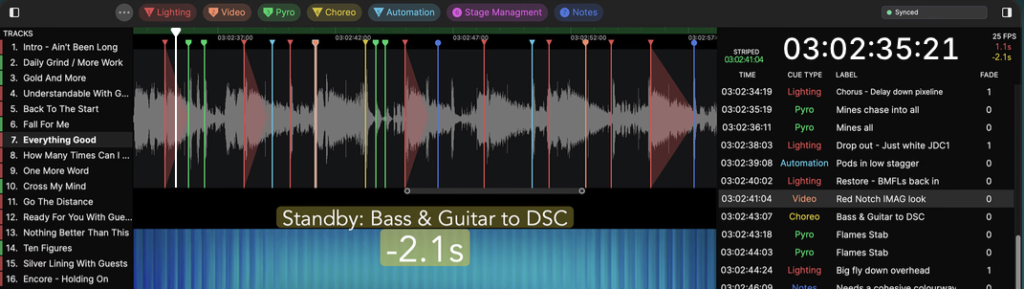
CuePoints — the macOS (and now Windows) cue management and timecode tool that’s become a staple for lighting programmers and show callers on timecoded productions — has released v2.0, and it’s a substantial overhaul. The headline feature is real-time cloud sync for collaborative projects, but there’s also a new recording workflow, significant timecode improvements, NDI in and out, OSC bidirectionally, and Windows reaching full feature parity with macOS. The pricing model has also changed.
If you haven’t come across CuePoints before: it’s a dedicated show planning and timecode tool aimed at the lighting and live production world. You import audio and video, build a cue list against the timeline, generate or chase LTC timecode, and export to grandMA, Eos, and other consoles. It’s the kind of tool that makes sense for programmers who are pre-building timecoded content and need to map cues against media before they’re ever near the rig. Version 1 was macOS only; v2 adds full Windows support.
What’s New in v2.0
Cloud Sync and Collaboration
One project, multiple users, live updates. Cues and tracks sync instantly across the team — add a cue on your machine and it appears for everyone. Access control goes down to cue type level, with an activity log showing who changed what. Works offline and catches up when you reconnect. Anyone on the free Viewer tier can join read-only.
Record to Timeline
Record video and audio directly from a capture card, NDI source, or iPhone. Trigger recording manually or via timecode; the recording drops onto its track automatically. OSC cues fired mid-recording land at the correct timecode position.
Timecode
Striped LTC is now read from media files on import, so you can add cues to the exact TC frame without a separate process. The timeline can chase incoming timecode from LTC, Art-Net TC, or MIDI TC. Track timecode outputs to Art-Net TC or MIDI TC. Change an offset or frame rate and outgoing timecode regenerates on the spot. Any media type — not just the primary track — can serve as the striped timecode source.
NDI and Overlays
Send up to three simultaneous NDI streams — with or without overlay — for use in previs or dedicated display screens. Build overlays with countdowns, next cue, timestamps, and watermarks; bake them into recordings and exports or view live.
OSC In and Out
Send OSC commands out of CuePoints per cue, to multiple interfaces. Control CuePoints playback via OSC from consoles, Stream Deck, or anything sending OSC — including a grandMA3. Updated OSC schema covers volume control, recording triggers, and timecode following commands.
Read Cues Off a Video
Draw a box over cue numbers burned into a recording and CuePoints reads them off the video and builds the cue list for you. Genuinely useful when you have video of a show but no cue sheet.
Other Improvements
- Windows: full feature parity with macOS
- Audio output: multiple output devices simultaneously, each switchable for routing
- Timeline: reworked zooming/scrolling, zoom to full waveform detail, A/B loop region
- Cue list: OSC command, note, trigger, trigger delay fields per cue; countdowns; timing between selected cues
- Settings: consolidated into one window (Audio Output, Timecode, Recording, OSC, NDI, Shortcuts, Tracks, Backup, Overlay Editor)
- In-app auto-update
- Faster syncing and cue loading on large projects
Pricing and Licensing
CuePoints v2.0 moves to a licence-plus-annual-plan model: £128 (~$173) + tax buys the software and the first year of updates, cloud sync, and support. After year one, the plan renews at £85 (~$115) + tax/year. Stop paying and the version you have keeps working — what stops is live sync, new updates, and support. Existing v1 owners get a discount on v2.0 based on when they bought (up to free for purchases in the last 30 days); check buy.cuepoints.com/getdiscountcode. Licence keys are replaced by email sign-in with a one-time code.
Note: Projects saved in v2.0 cannot be opened in v1.x. Work on a copy until you’re ready to commit. V1 licences remain active.
Download CuePoints v2.0 at cuepoints.com.

LatestHeadlines
- Cameo's ZIYA Series Splits the Difference Between Wash and Punch in an IP65 Package
- Luminex GigaCore Firmware v1.9.2: IGMP and QSFP Fixes for O26-I, SFP Tuning
- Disguise Replaces Disguise Cloud with MyDisguise, Teases X Series Launch
- Weekend Roundup — September 21–26, 2026
- Neutrik's FIBERFOX Line Gets Ruggedized for Harsh Environments