Midiator to Preview V2.0 of the VisionOS at Prolight+Sound 2011
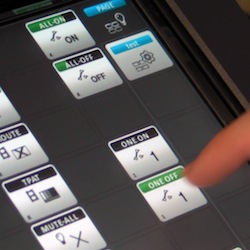 At the Prolight+Sound in Frankfurt, Midiator will present a preview of the upcoming V2.0 of the VisionOS, the core of the Vision Pro console. This new version will incorporate many new features developed in close collaboration with end-users and will be a major upgrade of the software as introduced on last year’s PLASA show. The 2.0 features give users the option to create complex shows ranging from live ‘busking’ widget interfaces to a complete programmed timeline show, in which the focus remains on the Awarded gesture-based interface environment.
The preview of this new version will include the following features: A new unified cue engine where cues can consist of up to 1000 devices and their variables, a grab ’n store functionality whereby settings on external devices can be stored with the press of one button and a new state engine which give users full real-time feedback of activity of the cue. All these features are also integrated in other upcoming features like timeline and scripting functionality.
Visual Productions to Launch CueCore Solid-State Control
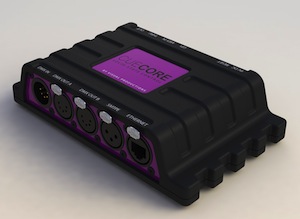 Visual Productions is preparing to launch their latest into control products, the CueCore. The CueCore is a stand-alone lighting controller. The device is completely solid-state, with no moving parts; it is an extremely secure and low-maintenance installation control solution that has only a minimal power consumption.
All operating and programming is done through its dynamic and rich, web 2.0 interface. Connected to a browser, the CueCore unfolds itself into a 1024 channel lighting controller, complete with an industry-standard command-line interface.
CueCore features a powerful Show Control logic for advanced system integration. This allows for interaction with other types of equipment and controllers. The Show Control editor enables you to program triggers and actions based on events from scheduled dates or times, GPI or any other incoming signal. The Show Control editor also allows for powerful protocol conversions between any physical port, like DMX or MIDI and Ethernet based protocols. CueCore also features a DMX recorder with a capacity for storing 16 individual tracks. Each track has 1024 channels and is compressed for maximum duration. Multiple tracks can be played back, each with individual master levels.
For full technical details of the CueCore please visit: Hall 11.0 A69 or www.visualproductions.nl.
New iOS App: FreeStyler DMX Remote App
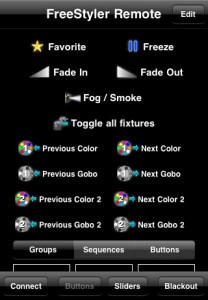 At the beginning of February, I mentioned a new iOS app that was on its way to the iTunes App Store. That day came during USITT, FreeStyler DMX Remote App hit the store.
The FreeStyler DMX Remote app is a companion app to the Windows based software, FreeStyler. FreeStyler for Windows is a FREE lighting control that allows for controlling you guessed it, DMX devices.
The FreeStyler DMX Remote App is a 99 cent app through the iTunes store. It allows control of the Windows software over wireless networking. The app allows for control of blackouts, favorites, freeze, groups, sequences, color picking, device manipulation and general controls.
Head over to the iTunes App Store to learn more and pick up a copy of the FreeStyler DMX Remote app. You can learn more about the app by visiting www.freestylerdmx.be.
Lehigh Set to Launch Rendition II Desk at USITT
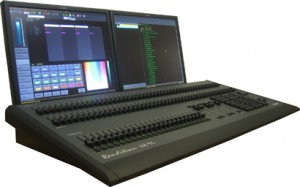 Lehigh will be introducing the Rendition II at USITT. This console includes both hardware and software upgrades to the original Rendition console series. Hardware features include 1.6 GHz processor, 2 GB compact flash hard drive, dual monitor and touch screen support, four USB ports, and fader wing support. New software features include cue level parameter timing for FCBI, independent channel timing, and color gel lookups. Automark, Move-in-Black and the addition of the Carallon fixture library (4000+) fixtures are slated for Q2 of 2011.
Rendition II consoles include dedicated channel and paged submaster controllers to provide classic theater control plus the latest moving light software features. The separate channel and submaster faders provide ease of use over the shared fader configurations of most other consoles. The Rendition II is available in 24/48 and 48/96 models with 24 paged submasters in 125, 250, or 512 conventional channel configurations. Each console includes an additional 1024 channels for moving lights, LEDs, and scrollers.
Ethernet-based fader wings allow expanded submaster or channel support for local or remote control and are available in 2 x 12 and 2 x 24 configurations. Learn more about the Rendition II by visiting Lehigh’s website at www.lehighdim.com.
Zero88 Releases ZerOS Remote App in Android Market
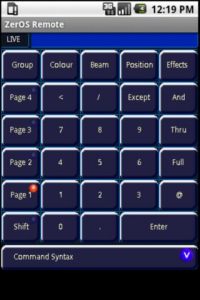 Zero88 just let lose their app for the Android OS in to the Android Market Place.
The ZerOS Remote Android app allows remote control of any ZerOS console. The app allows users to control their lighting rig from their Android device. From channel levels to playback the ZerOS Remote offers full control of the Leap Frog 48, Leap Frog 96, Frog 2, ORB and ORB XF consoles.
The ZerOS Remote App for Android looks almost the same as the iOS app from what I can tell from the pictures. If you have an Android Device, head over the the Android Market Place and pick up the ZerOS Remote app. It is a FREE download.
You can learn more about the ZerOS Remote App from Droid by visiting Zero88’s website at www.zero88.com.
ADB Lighting Set To Release LIBERTY & FREEDOM Control Desks
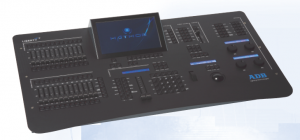 ADB Lighting will unveil at Prolight+Sound, Frankfurt a. M., Germany (Hall 9.0 Stand C50) LIBERTY and FREEDOM, two advanced lighting control desks, based on the very powerful HATHOR software platform previewed earlier this year. These two desks are unique in the sense they have been specifically designed for theatre stage lighting, without any compromise to cover other applications, as it is often the case with so called multipurpose consoles.
LIBERTY is the spot-on solution for space-challenging environments and any cost-conscious venue seeking a fully integrated solution to control conventional and moving lights as well as LED sources and other modern equipment in a compact and portable package with the capacity of much larger and more expensive lighting consoles.
FREEDOM offers the ideal solution when more multi-parameter instruments need to be controlled and fast access is required. The desk allows users to control large quantities of multiple LED fittings, intelligent lights or media servers as well as standard generic dimming systems. Features includes four additional rotary wheels with push button function, a set of special keys to manipulate moving lights, and a super smooth, large size trackball for precision positioning control.
Learn more about the ADB Lighting LIBERTY & FREEDOM Desks by visiting their website at www.adblighting.com.
Chameleon Lighting Software Releases V1 RC8 with New Features
 Back in November, I mentioned a new lighting software title out there for the Mac called Chameleon. Looks like development of the software is coming along nicely with the release of Version 1.0 RC8.
This release fixes a few bugs, includes the new USB drivers from FTDI (fully compatible with the 10.6.5 release now), and adds a couple of cool new features.
You can now assign user buttons to ‘radio button’ groups so you can make sure only one scene in a group can be on at a time. This is useful for making sure that scenes and looks don’t overlap when they shouldn’t. When you put your mouse over a button, a popup window appears telling you which group it is in, and all other buttons in that group appear outlined in light grey.
For more advanced users, we’ve now added a comprehensive set of keypad command allowing you to patch, re-patch and unpatch channels to addresses. In record mode, just hit the p key and patch away. Once you’ve got the hang of it, it saves a huge amount of time in set up.
Head over to www.maclightingsoftware.com to download and try the software or to update your version.
Pathway Announced Pathport Manager 5.1 Software With RDM
 The set-up and management of Pathway Connectivity’s Pathport line of DMX-over-Ethernet nodes has just gotten easier and more comprehensive.
A feature which will appeal to both casual and power users is the new IP-address auto-corrector that simplifies configuration and trouble shooting. “The most common support call we get is for help with IP addressing,” explains Robert Armstrong, Manager of Technical Sales and Support for Pathway. “This release of Pathport Manager detects IP problems and corrects them on the fly. No other node configuration tool does this.”
Also new is an integrated RDM configuration screen. “Although RDM is starting to appear in moving lights and LED fixtures, we’re in a bit of a chicken-and-egg situation,” says Armstrong. “There’s no point in having a feature if you can’t reach it. By adding E1.20 management, we’re giving anyone who ever bought a Pathport the ability to unlock the value RDM brings – at no extra cost to them. Not only can you change DMX start addresses and operating modes, you can also retrieve sensor information and manufacturer-specific properties.”
New Pathport firmware versions, bundled with the release, extend the reach of Pathport networks in other ways. E1.31 streaming ACN is fully supported, with transmit and receive of both Draft 20 and the final ANSI release selectable by the user. A virtual dipswitch allows Pathports to listen to Art-Net universe 0:0, making Pathports a natural bridge between Art-Net-based media servers and Net3 installations, among others.
Pathport Manager 5.1 recognizes the Strand Palette consoles, ShowCAD controllers and the Jands Vista, and will discover and configure the new Pathport VIA 10+1 gigabit switch, introduced at LDI 2010. And of great value to venues using Strand and Entertainment Technology raceway dimmers, Pathport Manager 5.1 unlocks full protocol support in those products, including Art-Net and sACN.
Pathport Manager 5.1 is a free download from the Pathway Connectivity website. Windows users can choose between installer versions with or without an embedded Java Runtime Enviroment. Separate versions for Mac and Linux users are also available on the site. Just go to www.pathwayconnect.com and look for the link on the home page.
MA Lighting Releases grandMA Software 2.2.0 [6.6]
 MA Lighting just announced the release of their latest software update for the grandMA2 control surface. The update is intended for the the entire range of MA Lighting products, the grandMA 2 desk, grandMA 3D and MA VPU hardware devices.
Some of the new features:
- New help functions.
- Backup menu, load only “userprofiles”
- Better work flow when using “at filter”
- DMX Tester has a new “unpark” button
There are a ton of updates and bug fixes in the software update. Read all of the changes in the Release Notes. You can download version 2.2.0 [6.6] of the software update from MA Lighting’s website www.malighting.com.
New iOS App On Its Way: FreeStyler DMX Remote
A new lighting app to hit the iTunes App Store in the next couple of weeks will be the FreeStyler DMX Remote App. You may have heard of the Windows based software title, FreeStyler. The upcoming iOS app will be a companion app to the Windows software and requires version 3.3.2 of FreeStyler. Get ready for this… the FreeStyler Windows software.. FREE! You can download the FreeStyler Windows software from www.freestylerdmx.be, and yes, it is in English.
Max Bäumle, the developer of the upcoming iOS app sent me a quick video showing off how the new iOS app works. As you can see from the video below, you have full control of any fixture including the color picker and pan/tilt. The app also allows you control of blackout, favorite, freeze, groups, sequences and flash buttons through the FreeStyler software.
The FreeStyler App is expected to hit the iTunes App Store in march 2011. Look for an announcement here on iSquint.
Martin Revamps LightJockey 2 Packaging & Open Hardware Replacement Program
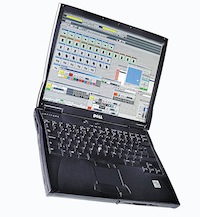 Martin Professional’s PC-based lighting software, LightJockey 2, is now shipping with the new Martin One-Key protection device, one Martin USB DUO DMX and the MSD5 MC Edition 3D Visualizer.
Martin also announces a LightJockey hardware replacement program. Through the program, old LightJockey hardware from an ISA PC card to a Universal USB device can be returned for exchange.
The replacement kit includes the Martin One-Key, either one or two Martin USB DUO DMX’s, and an MSD5 MC Edition 3D Visualizer. You can learn more about Martin’s One-key by visiting their website at www.martin.com and/or by downloading a PDF explaining the One-Key.
VirtualLightDesk App Added to Mac App Store
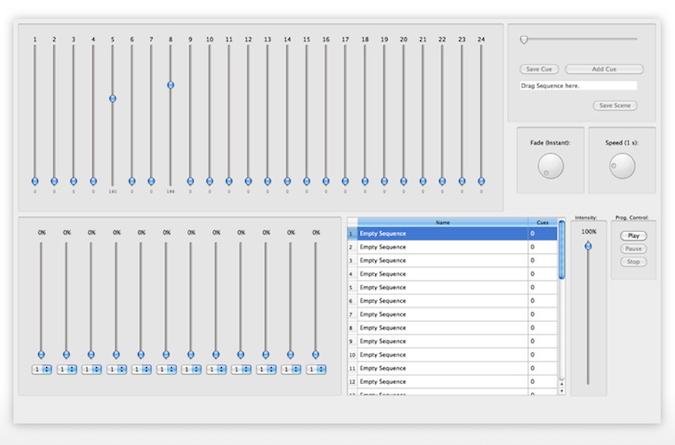
Mac Developer Thomas Günzel has the release of VirtualLightDesk app to the Mac App Store. VirtualLightDesk is a 24 channel console that runs on the Mac platform. In order to output from the software to any DMX device, you will need the Enttec Open DMX USB interface.
The VitualLightDesk app has the ability to operate 24 channels of DMX with up to 32 programmable sequences and 128 cues per each sequence. The app also features easy drag n’ drop file system or organizing your desk. The app require Mac OSX 10.6.6 and cost just $5.99 USD from the Mac App Store.
There are plans for the app to output Art-Net in future versions and updates of the software. You can learn more about VirtualLightDesk by visiting Thomas’s website at thomas.gruenzel-ag.de. I have linked the Google translated page in English.