LDI09: Rumor Mill – Behind Closed Doors
 We love rumors around the industry here on iSquint and it seems like LDI will be the starting off point for some rumors to start spreading.
So what sort of rumors have been mumbled about around the industry with LDI right around the corner?
Lets first take a look at ETC, (Electronic Theatre Controls). We have heard mumblings that their control line up of consoles is not complete yet. So could this mean the release of a new console soon? Details on this rumored new console that we are naming after our favorite alien, ET, are very scares. But we may be able to get a better understanding at LDI next month.
Next from Philips Strand, we have been hearing this phrase, Open Palette. We are quite sure this is a new console, but open? With the use of such a word as Open, we can only assume that means it will be an Open Platform in sorts similar to Open Source Code where users have the ability to customize features and/or layouts.
Certainly not last, will an LED ellipsoidal spot light be announced at LDI? There is a huge race to be the first to the market with this. But if something is rushed and not ready, there could be a huge backlash from the industry. An LED ellipsoidal will happen, but when?
UPDATE:
Look like we were wrong about the strand Open Palette. Seems like it has been around for a while!
ETC Releases Congo Software Version 6
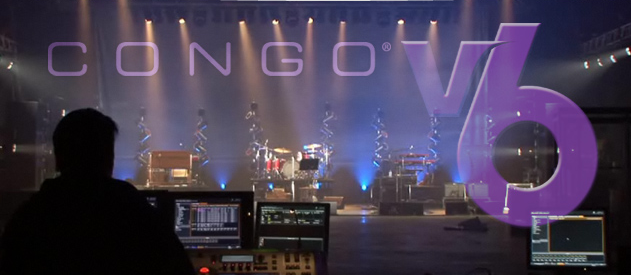
ETC just recently announced the release of the latest software for their Congo line of lighting consoles, Version 6. The upgrade is a free download from ETC’s website, www.etcconnect.com and is for the Congo, Congo jr. and Congo LPC.
Here are some of the core updates to be found in version 6:
New Image Effects
ETC has added another powerful effect type to Congo: Image Effects. Image Effects use the Effect Playback concept from Congo v5 software to associate a layout of channels (which creates a graphical or positional relationship among included channels) with a source image or text. Parameters of the Effect Playback include positioning of the image on the layout, scale and aspect of that image/text, rotation, and effects like constant rotation, scaling or scrolling. Multiple effect playbacks allow for layered image effects.
Jam Mode
ETC has done a lot of work on Jam mode, making it easier for users to determine what data gets generated and where that data ends up in a play file. Users can also regenerate data quickly using the new Jam Mode Wizard. For those who like to experiment, we’ve added in Two Scene Masters where users can create a look “blind” using the top row of masters, then fade into that look in time using the Master Controls. The scene created on the top row of masters becomes “live” on the bottom row of masters, where additional adjustments can be made on the fly. This powerful feature of Congo v6 makes busking a breeze.
Masters
ETC has increased the number of Master Playbacks to 80 and made a lot of changes to the Masters, allowing once-global settings to be applied per master – including rubberbanding and exclude-from-record. And, there are new settings, such as the ability to choose what look a rubberbanding master returns to – this can be the previous state, or back to the main playback, or to a designated preset. Also improved is the Masters display and dock, allowing users to see a lot more information about the masters, including more steps of a sequence on a master.
Learn Profile
ETC has improved playback by incorporating the ability to learn a fade profile for crossfades in the Main Playback. Simply enable “Learn Profile” on a soft key and then move the faders in the manner you want the crossfade to happen. Also new is an indication of the current playback location (what’s in A and B) within the Sequence List editor.
Channel Views
The channel views have changed, giving users more options for the amount of information that is displayed within a channel box. There is also a new set of symbols in the Channel Layouts supporting more TV/film fixtures and adding special-purpose symbols as well. Now users can even draw circles!
Blind Editing
ETC also changed the way that blind editing is done, allowing for live moving-light controls to be used within blind views. This means that instead of using spreadsheet-style editing, users can view blind data and move encoders, use direct selects and other keyboard commands to select channels and enter data directly, as in Live.
New Docks
A number of new docks have been added, including the Designer Summary dock that collects important data about the main playback and/or selected channels and puts it in one compact location on-screen. A Timecode dock displaying a large clock for internal or external time code has been included. It enhances Congo’s functionality with support of the Net3™ Show Control Gateway for interaction with MIDI and SMPTE on the network, as well as adding an internal backup clock within Congo itself. There is also a new Selected – Live dock that shows the channels and effect playbacks users select in the Live tab.
Structural Changes
Congo has undergone some major structural changes including more Preset numbers – from 0.001 to 9999.999 – making it easier to organize shows that use multiple sequences. Also, finer timing resolution under ten seconds is now possible – 0.01 to 9.99 seconds. Lastly, 16-Bit intensity is now supported, providing improved control of automated fixtures and accessories that utilize high-resolution motor control and improved mastering of LED fixtures that use 16-bit color parameters.
You can view a preview movie of the new software code of the Congo by visiting ETC’s website, www.etcconnect.com/Congov6.
ETC Releases Eos/Ion Software Verison 1.7
 We just heard through the grape vine that ETC’s Eos/Ion/Element software version 1.7 is out and ready for download from ETC’s web site. The new version is for the Eos, Ion and element consoles, remote processor units and remote video units.
Also released was the 1.7 version of the offline editor for Eos and Ion as well as the offline editor for the Element. So all you folks that bought your iPhone iRFR app early on not have a chance to actually use it!
Here are some of the new features of Eos/Ion software version 1.7
- Dimmer feedback from Sensor®+ 3.0 systems equipped with Advanced Features modules
- RDM configuration and monitoring
- Multiple external USB connections for fader wings
- Display of frame tables by Frame number
- External trackball support for mouse operations and pan/tilt controls
- 400+ new fixture libraries
- File Manager in the shell
- Support for the iRFR application (Radio Focus Remote for iPhone® and iPod® Touch)
- Lamp controls are added to the fixture editor
Download the new console software for Eos, Ion and the Element from ETC’s web site, www.etcconnect.com.
Review: ETC Element Lighting Console

At USITT this year, Electronic Theatre Controls announced the birth of their latest addition to the EOS line of lighting consoles, the Element. Since that announcement, we have been reporting updates on the progress and anticipated ship dates. To further update the progress of the Element, ETC has already begun to take orders through their dealer network for the console. While they are taking order, the Element is expected to being shipping sometime this summer. While we wait for ETC to begin shipping the Element, the kind folks from Middleton were nice enough to send us a prototype with Beta software Version 1.5 of the Element.
To Read the entire review: (more…)
Just Released; The ETC iRFR iPhone App
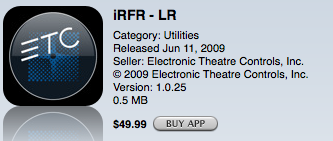 It has been a long time since we last mentioned the ETC iPhone app, the iRFR. Today the iRFR iPhone app has shown up in iTunes! The iRFR is a remote focus unit similar in both function and layout of the Radio Remote Focus Unit but runs on the Apple iPhone and iPod Touch and works of the WiFi connection. The iRFR is able to function as a remote for the Eos, Ion, Element, Congo and Congo Jr. Lighting consoles.
Before you get carried away and download the iRFR, to work with the Eos, Ion consoles, they must be running an unreleased version of the console software, version 1.5. Version 1.5 is expected to be released in the near future. Good news though if you are a Congo or Congo Jr. user, the iRFR needs the console software version 5.1 which is already released.
An additional piece of hardware that you will need to incorporate into your lighting network is a wireless access point in order for the iRFR to connect to the console. It is recommenced that you dedicated a wireless access point for the lighting network and not attach it to any existing computer or internet connection. For more information on setting up a wireless connection, visit the iRFR wiki page.
The iRFR retails for $49.99 through the iTunes app store. There are two version of the iRFR app within the iTunes app store based on the charity that you would like to contribute to. The first one being the iRFR-LR where proceeds will go to Light Relief and the second being iRFR-BTS where the proceeds will go to Behind the Scenes.
ETC Previews Congo v6 at ABTT & Showtech
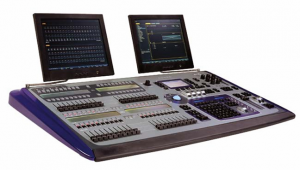 ETC has been previewing the latest update to the Congo line of consoles, version 6. The ETC Light Minds Think Alike blog post some of the new features of version 6.
One of the interesting updates in v6 is that there are even more, yes MORE presets available from 0.oo1 to 9999.999. Personally, I don’t think that will be enough as I need that 10,000.000 preset, makes numbering easier.
Here is a basic run down of some of the other updates and changes made in v6.
- Channels Views – Re-design of what information is shown in the channel box
- Blind Editing – moving light controls brought in.
- New Docks – Designer summary, timecode, live dock have all been added.
- Learn Profile – Learn a fade profile for crossfades in the main playback
- Masters, Masters, Masters – Updated to 80
- Jam Mode – Added Two Scene Maters to create a look blind
- New Image Effects – Uses the Effect Playback concept to associate a layout with channels with source image or text.
The new version 6 will be available for download sometime during the summer 2009.
ETC Introduces Unison Mosaic Show Control
Today, Electronic Theatre Controls, (ETC), introduced their latest show control product to the Unison Control product line, Mosaic. Unison Mosaic Show Control is based on the award winning Pharos show control technologies and has a range of software, controllers and accessories such as the Designer software, Unison Mosaic Expansion Modules, Unison Mosaic Show Controller X and the Unison Mosic Remote Input/Output Modules.
Mosaic combines innovative software and hardware. Mosaic Designer Software™ provides the framework for creating art, while Mosaic Show Controllers™ (MSCs) are the compact hardware solution, running events reliably and precisely, show after show. Engineered with unique environments in mind, Unison Mosaic Show Control presents a comprehensive control solution for architectural exteriors, retail, museum and themed spaces, art installations, special events, and innovative projects yet to be imagined.
By bringing these Mosaic show-control products into the Unison brand – alongside the Paradigm™ and SmartLink® offerings – ETC puts it all together with the most comprehensive range of products for controlling LEDs and creating energy savings.
Detailed Unison Mosaic show control information can be found at www.etcconnect.com/mosaic.
ETC iPhone/iPod Touch iRFR App Update
 Doing our morning stroll around the internet, we noticed that ETC’s David Lincecum has posted an interesting and insightful update on the progress of ETC’s iPhone/iPod Touch app, the iRFR at the companies blog, Light Minds Think Alike.
The post gives us an insight to the delay of the release of the app due to ETC’s rigorous software testing and development. Thus showing ETC’s commitment to providing products that meet their high standards of excellence and usability.
The post also mentions how ETC may have jumped the gun on announcing, demoing and advertising the iPhone app before completion and submitted to the iTunes App Store may have been less then a good idea. ETC has received numerous request for not only the app, but more information about it and when it might be available. At the moment, the only thing the marketing department is saying at this point is “I hear that the iRFR is “almost done””.
We have not been able to confirm any information about when the app may be ready and available to the public. We do know that the app will cost around $50. USD and that either all the proceeds or part of the proceeds will be donated to Behind the Scenes or Light Relief.
Update: More Info on the ETC Element Console
We just learned more information about the ETC Element Lighting Console. Sounds like ETC will be accepting orders of the new console through their dealership network beginning May 4. While they begin to take orders, actual consoles will not begin to ship until late summer. We have also learned the new pricing range of the four version of the console.
- Element 40, 250 Channels – $5,500
- Element 40, 500 Channels – $6,000
- Element 60, 250 Channels – $7,000
- Element 60, 500 Channels – $7,500
To learn more about the Element Console, visit ETC’s mini website at www.etcconnect.com/element. To order you Element now, visit the dealer section of their website to local the closes one to you.
ETC iRFR iPhone App – Update
 We wrote yesterday about ETC demonstrating one of their latest products on the show floor of the USITT Stge Expo, the iPhone iRFR app. We were able to get a few more images of the iRFR in action as well as a bit more information. One of our readers, robinsta, talked with ETC reps in the booth and was able to get a price on the new app at $ 49.95. Compared to some apps in the iTunes library, this may seem a little high, but with the features this app provides it will be well worth the money. Then of course there is the fact that either all or portion of the proceeds goes to Behind the Scenes and Light Relief, makes it even more appealing.
We are still waiting to hear when the iRFR app will be ready for download from the iTunes store. At the time of this writing, it has not been added. We also have to wait for the latest version of the Eos/Ion operating system upgrade to be released from ETC in order for the iRFR app to work in conjunction with the consoles.
We have added a couple more screen shots of the iRFR iPhone app in action to the 2009 USITT Photo Gallery.
ETC Demo’s The iRFR iPhone App
Electronic Theatre Controls (ETC) just announced the release of their latest control product called the iRFR Lighting Control iPhone/iPod Touch App. The iRFR (iPhone Radio Focus Remote) is designed to work with ETC latest line of lighting consoles, the Eos, Ion, Element, Congo, Congo Jr. and Congo LPC.
System Requirements
- iPhone Software 2.0
- iTunes 8.0+
- Eos/Ion/Element Software 1.5v
- Congo Software 5.0v
- Closed Wireless Network
The iRFR functions much like the current Radio Remote Focus Unit that ETC offers for their line of console. In fact, the layout is almost exactly the same. Since the iPhone and iPod Touch are multi-touch devices, the iRFR is able to offer a few more features then the RFR. One feature that was integrated into the iRFR is the encoders page. You can select a channel that is a device with Pan and Tilt features and then go into the encoders page of the iRFR and select the parameter that you wish to adjust, such as Pan and start to pan the fixture left or right. All of the parameters of a device are populated into a large scroll wheel, (think the big wheel on game show, Price Is Right) and then scroll left or right to adjust that parameter.
Another great feature of the new iRFR iPhone app is the Live Color picker. When you select a device channel that has the ability to change colors by means of either RGB or CMY through color mixing, you can find a color off a color wheel to send that fixture to. At the bottom of the screen you are given the Hue and Saturation levels as well as cross heirs on the color wheel to let you know what color you have chosen.
As we mentioned in our earlier rumor posting, the iRFR is made available through iTunes at an undetermined price at the time of writing. What is unique when purchasing the iRFR app through iTunes is that the user will be prompted to choose which charity that they wish to donate the proceeds of the purchase too. ETC continues to support the industry that they work in by donating the proceeds to ESTA Foundations, Behind the Scenes and the UK equivalent, Light Relief. Both organizations provide support for our fellow professionals who have become unable to work due to a work related injury. We at iSquint support both efforts and encourage our readers to do the same. Please be sure to click on the logos below to learn how to support these great organizations.


ETC has not made information about the iRFR avilable through their website yet as it has not been offically released. Look for more information to follow here on iSquint.
ETC Element Console – More Details
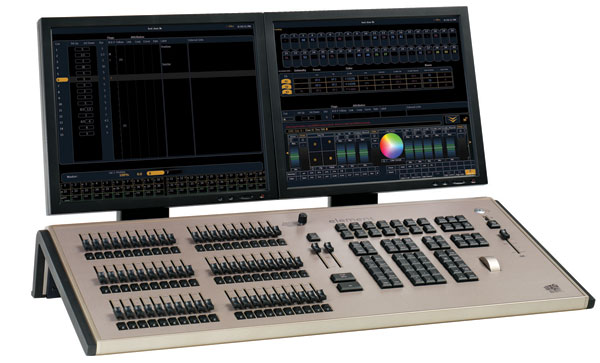
Yesterday we posted about the long rumored Element Console from ETC. Today, the start of USITT Stage Expo in Cincinnati, we have more information and photos.
The Element Console is based on ETC’s Eos control operating system but with a simplified feature set in an all in one package. The Element is designed for smaller lighting systems with the larger selection of faders on board. Which can either be channel faders or submasters at the turn of a switch, similar to the Congo’s master and channel knob.
The Element comes in two hardware versions based on fader count. That being the Element 40 or the Element 60. From there each supports either 250 or 500 channels depending on how many you need. All the models of the Element support up 2 universes of DMX on board or via ETCNet. The thing to remember as in most modern lighting consoles, one channel now can equal one device. That one device can be a one DMX address dimmer, or a 36 DMX address moving light.
Channel Faders you say? The element gives you 40 or 60, depending on which model you go with. These are true LTP (Last Takes Presidents) channel faders. This means that building shows from channel faders for use as submasters or cues is quick and easy, thus not requiring channel and intensirt enter via the keypad. Another nice feature about the channel faders is that you can edit levels of channels stored in subs or cues all while live.
Now you want to play with submaster on faders, no problem, turn a switch and there you go. The faders that were once channel faders now act as submaster faders. On the Element 60, you have 20 dedicated submaster on board and then an additional 40 with the switchable 40 channel/submaster fafers.
The Element is design for smaller lighting systems and thus not needing the ability to have 999 cue list likes is big brother, the Eos. The Element only has the ability to run one cue list. But when the time is right, a novice can become a master of their domain by jumping into more complex timing functions such as cue parts, follow/hang to create more intelligent lighting transitions.
More information will be coming on the Element as the time progresses. In the mean time, visit the newest section of ETC’s website, www.etcconnect.com/element. Now what everyone has been waiting for, more pictures!
[nggallery id=3]