Truck Packer Is the Load-Planning App Touring Shops Have Needed
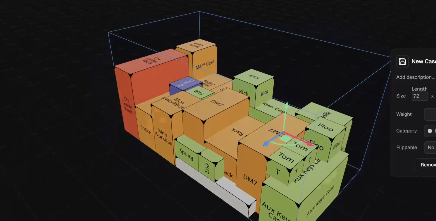 If you’ve ever spent two hours doing math on a whiteboard trying to figure out how to fit a tour’s worth of gear into three semis, Truck Packer was built for you. It’s a browser-based 3D load-planning tool designed specifically for production — touring companies, warehouses, rental shops — and it’s already being used by a growing number of crews to cut load-out planning time dramatically.
The core idea is straightforward: input your cases (dimensions, weight, stack rules, packing groups), point it at a trailer or container, and let AutoPack generate candidate layouts before anyone touches a strap. You get a 3D view, a few layout options to compare, and a crew view checklist you can share with the loading dock. Packs that reportedly used to take a couple of hours wrap in under thirty minutes.
The app supports trailers, box trucks, shipping containers, air ULDs, and custom spaces — you define the geometry yourself, so it reflects your actual rigs. Cases can be imported via CSV or XLSX, and the manufacturer library lets you pull in dimensions from a growing list of touring case makers rather than measuring everything by hand. There’s also a LiDAR/AR companion iOS app (Cargo Measure, currently in closed beta) that measures real cases with an iPhone Pro and pushes them straight into your library.
Version 0.10, released August 12, is the biggest update since launch. Business-tier accounts now get multi-truck packing — one plan covers the full fleet instead of a separate pack per truck. Also new: a full container library with ready-made presets for US and EU road trailers, air ULDs, rail cars, and rental trucks; a redesigned library browser; a Loading Dock inspector; and per-container PDF exports and crew views.
Key Features
- Browser-based 3D packing environment — no install required
- AutoPack: one-click layout generation with multiple candidate outputs
- CSV/XLSX import and manufacturer case presets library
- Multi-truck packing (Business tier) — one pack for the whole fleet
- Container library: trailers, box trucks, containers, air ULDs, rail cars
- Stagera integration: pull sheets push directly into Truck Packer
- Cargo Measure AR iOS app (beta): LiDAR case measurement to library
- Crew View with load-in checklist, truck ruler, and shareable links
- PDF export with custom branding (Business tier)
- REST API and real-time collaborative packs (Business tier)
Learn more about Truck Packer by visiting truckpacker.com.

LatestHeadlines
- Cameo's ZIYA Series Splits the Difference Between Wash and Punch in an IP65 Package
- Luminex GigaCore Firmware v1.9.2: IGMP and QSFP Fixes for O26-I, SFP Tuning
- Disguise Replaces Disguise Cloud with MyDisguise, Teases X Series Launch
- Weekend Roundup — September 21–26, 2026
- Neutrik's FIBERFOX Line Gets Ruggedized for Harsh Environments