iSquint Podcast – Episode 4 – ETC at LDI
 In this, the fourth episode of the iSquint Podcast, I got a chance to sit down with Anne Valentino and David Lincecum for ETC, (Electronic Theatre Controls) at LDI in Orlando Florida. Anne and David explained how the Eos family of desks were developed and how they listened to the lighting community to design the desks. They also gave me a sneak peak at ETC’s next desk that is still in development which I hinted about a couple months ago and gave it a code name of ET.
We also talked about some of the new products that ETC introduced at LDI 2009. The first being the Selador Fir and Ice LED fixtures. We talk about how the Fire and Ice will fit into the market place and how ETC developed and designed the new LED fixtures. While at LDI, I sat down with Novella Smith and recorded a video of Novella explaining and demonstrating the new fixtures.
David and I also talked about the other new product line that ETC introduced at LDI 2009, the Rigging Division with the Prodigy Hoist System and the Quick Touch Controls.
Look for more interviews, tech talks and product reviews in future episodes of the iSquint Podcast.
[podcast]http://isquint.net/wp-content/uploads/podcast/iSquint.net_Podcast-Episode_4.mp3[/podcast]
TourTek Truss Management System
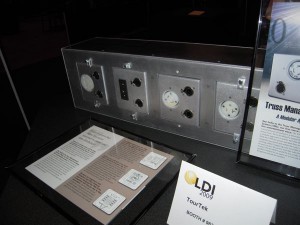 Back at LDI 2009, I got a chance to see some great new products, one of which is the Truss management System from TourTek. If you have ever ran cables over truss, you know how much “fun” it can be. Not only do you have to make sure that you fan outs are at the correct location for you lights, but you also might need to run DMX cables. Cables can become a nightmare and quite difficult to track back, replace and even find.
In steps the Truss Management System from TourTek. They have takeing the need for fan outs, multiple DMX runs and all thee associated cables into a modular system located right on the truss. Think of the Truss Management System as a connector strip found on a line set only much lighter and more configurable.
The Truss Management System distributes your power and data using our pre-wired housing units. They also have easily accessible service panels so you can change your circuits depending on your show or venue. The days of running countless feet of socapax cables down a truss are over. Not only does this save on cable wear and tear but it saves tons of time. Since the housing units live inside your trusses, they are always there. Nothing extra to load in or load out.
The Truss box, (or strip), comes in two sizes, 8′ long with the ability to hold 12 modules or a 2′ section that can hold up to 4 modules. Since you already have all your power circuits and data run all you need to do is pop in your module and plug in your fixture. Bam. Fully wired. Now lets imagine a fixture goes bad and you need to replace it with a fixture that has a different power plug. No problem. Pop in a module with the new type of power plug, attach the fixture and blam-o.
There currently are three types of interchangeable modules, the Edison/Straight Blade, Twist Lock and the Stage Pin modules, all pictured below.
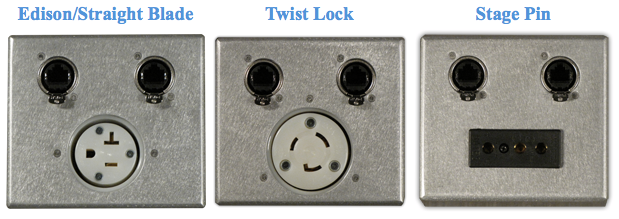
In addition to having a power connection at each module, each module includes a DMX in and out. Currently, it seems that only RJ-45 connectors are available for data, but I have to assume the 5-pin connectors might be available as well. Though the TourTek web site does not mention that. To learn more about the Truss Management System From TourTek, visit their website at www.tourtek.com.
UPDATE: I just received a note from TourTek about the RJ45 connection on the modules.
I wanted to quickly clarify how we use the RJ45 connection on the modules and how that applies to the end user. The RJ45 is the only termination we provide on the modules themselves. So if you have a fixture that accepts an RJ45 plug, you’re in business with ease. For those who require a 3 pin, 4 pin, or 5 pin DMX connection we include a 2′ adapter. So if you order a module and specify you need 3pin DMX connections, you will receive a Cat5 to male 3 pin and Cat5 to female 3 pin adapter. Those are included as part of the price of the module.
iSquint Podcast: Episode 3 – Squintin’ at the grandMA2
 In this, the third episode of the iSquint Podcast, I got a chance to sit down with Brian Dowd and Joe Cabera from ACT Lighting to talk about the grandMA2 lighting desk. Joe and Brian were kind enough to take time out of their very busy trade show duties to sit down and explain to me some of the differences between the grandMA and the grandMA2 hardware and software.
Cat West and Joe Cabera released a preview of the interview that we did on their website called ConsoleCocktails.com titled Squintin’ at the grandMA2. You can check out the video at their site as well as ACT Lighting’s Blog. And no, Joe did not lose his legs during the interview!
Don’t forget, you can subscribe to the iSquint podcast through iTunes.
Side Note: I have heard from some readers that there is a little game that they like to play with the iSquint Podcast. The third episode unintentionally continues to provide that level of entertainment. Let’s just say, the grandMA2 is impressive. ;)
[podcast]http://isquint.net/wp-content/uploads/podcast/iSquint.net_Podcast-Episode_3.mp3[/podcast]
Published in this Months Issue of PLSN

During LDI this year, I had one heck of a crazy schedule with meetings, lunches, dinners, parties, product demos and of course walking the show floor for two days straight. One of the highlights of my trip was sitting down and having a lovely dinner and chat with the Editor of PLSN, (Projection Lights & Staging News), Mr. Richard Cadena. After just a couple of moments talking with Mr. Cadena, Richard, I was in awe of his vast knowledge and insights of the lighting industry. Richard has some amazing stories as well a deep and profound passion for the industry to which we share. He and PLSN are a real asset to this industry of ours.
During the course of our dinner, we talked about different aspects of the industry and what new and interesting things that we had seen on the show floor. Even though I was on the show for for 16 hours and the LDI show was smaller in size compared to previous shows, you would think that would be plenty of time to see everything on the show floor, how untrue that is. While going over the things that we had seen, it was amazing to hear of things that I missed as well as tell Richard about somethings he missed. It is at that point Richard asked me to write a show report for his publication, PLSN. I was and still am honored to do so. Thank you Richard for this opportunity to share my opinion of the show in your publication.
You can download my show report of LDI that was printed in this months issue of PLSN. If you would like to read the entire magazine, you should subscribe to it here to get the print version. To help tide you over until the print version arrives, you can download the PDF version here from PLSN.
Thank you once again to Mr. Cadena and PLSN for this opportunity. It was a real treat and pleasure for me to share my experiences at LDI.
Side Note: I only was able to walk the LDI show for for two days and still did not get a chance to see and talk with everyone. Maybe that is why there are three days of the LDI show. Next year I will just have to catch the Red Eye home!
Dr. DMX Develops Green Dimmers
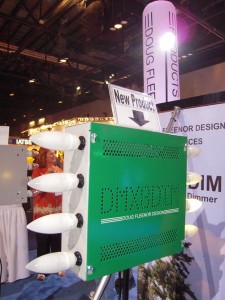 Leave it to the good doctor, Doctor DMX, aka Doug Fleenor Designs, (DFD) to develop a new and interesting product for LDI this year. We all know that Doug Fleenor Design comes out with some pretty remarkable DMX products like the DMX/RDM Coffee Pot and the DMX-a-Sketch at past LDI’s. This year was no let down.
Doug Fleenor Design had a DMX Blender on had to mix up some lovely adult drinks during the show. On a side note, when o when is DFD going to produce these wonderful devices?! I would love to operate my entire kitchen off a lighting console!
What DFD did have on the show floor that we can purchase in the near future is DFD’s entry into the dimmer world with the Green Dimmer. DFD designed the Green Dimmer as low power dimmer to drive 250 watt or less loads for such luminaries like LEDs, CFL and even neon.
The Green Dimmer operates off a 120v, 20amp power input and splits it off into 8, 2amp dimmable outlets. Would you be surprised to know that this is of course controlled by DMX? All of this fits into a 12″ x 12″ x4″ NEMA 1 enclosure and runs super quite as there are no fans or filters.
I was not able to get a price out of the good doctor and information has not reached the DFD website as of yet. Look for more information about the Green Dimmer from Doug Fleenor Design here on iSquint. To learn more about the neat DMX products the good doctor produces, visit DFD’d website at www.dfd.com.
Jands Vista Preparing to Release Byron Into the Wild
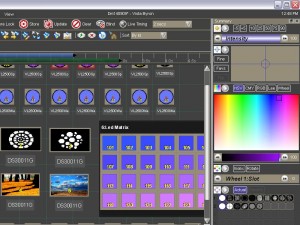 Back at PLASA 09, Jands Vista introduced their latest software upgrade to their Vista line of consoles, Byron. Jands had demo’s of Byron running at LDI 09, but alas, I did not get a chance to see Byron running in person. But since then, I have meet Byron and he is a pretty cool dude, I mean OS.
What impresses me about Byron is that is uses Apple’s proven Bonjour™ networking technology to configure a lighting network, a ‘no IT guy’ solution that makes backup and more advanced networking operations easy. With Byron you’ll never have to enter an IP address or configure a DNS server again.
Another key addition to Byron from Vista’s old operating system is the addition of a command line. The Byron command line is completely synchronized with the interface, showing the clip or step you’re editing at any time. When you type a command you see the equivalent action happen on the fixture icons and control palettes: all pen-driven commands are interpreted into plain language on the command line in real time. Of course, the command line supports all well-known numeric keypad syntax (for example, typing ‘1/26*55’ would set fixtures 1 to 26 at 55% intensity).
If you’re used to selecting lights and setting levels by numbers, you can use the command line in combination with the Vista’s visual interface to give yourself even greater control than before.
Some of the other new features of Byron:
- tracking backup that synchronises a second console or PC to take over seamlessly in the case of a failure
- a second-generation timeline providing visual split fade times, a per-step timing structure that lets you instantly set fade and delay times for some or all the events in a step, and new filters that make it easier to see what’s going on with big rigs
- an extended generic fixture model that doesn’t limit the use of non-standard or overlapping features and adapts to all types of new and unusual fixtures
- a completely overhauled user interface reflecting user feedback, with search functions built in throughout
- a brand new visual method of controlling media servers
- new Matrix layouts and effects for use with LEDs and other fixtures
Byron will be a free download and upgrade for current uses when it is finally released. A time line for release has not be announced, but should be sometime during the first quarter of 2010. To learn more about Byron from Jands Vista, visit their website at www.jandsvista.com.
ESP Vision’s Early Christmas Present – Version 3.0 on Sale!
 During LDI 2009 , I wrote about ESP Visions announcement of Version 3.0 release with the great news that the software will run nativily on a Mac. Well, I just received an email from Lighting and Sound America that ESP Vision has an early Christmas present for everyone!
ESP Vision is giving you an early Christmas present. We are proud to announce the release of the next generation in its lighting pre-visualization software with Vision 3.0.
Purchase Vision 3 Mac or Vision 2.3 PC by December 31, 2009, and get a great deal. First, FREE SHIPPING on all orders AND enjoy the following discounts:
- 1-3 Universes – get 10% off (Use code XMAS09A and save up to $225)
- 4-9 Universes – get ONE FREE UNIVERSE (Use code XMAS09B and save $750)
- UNLIMITED – get an extra year’s subscription (Use code XMAS09C and save $1,500)
But you must act before December 31, 2009. Go to www.espvision.com/buyit and enter the discount code. Or contact us at sales@espvision.com, or via phone at 702-740-1870. Existing customers can add to their current licenses, as well!
Talk about some great savings! Hurry and get your order in before the end of the year!
Thanks L&SA!
Avolites Introduces Tiger Touch Lighting Console
 During LDI 2009, I got a chance to stop by and take a close look at Avolites latest lighting desk, the Tiger Touch. The Tiger Touch is a “hybrid” of the of powerful Diamond 4 functionality coupled with the friendly Pearl interface. The desk features a wide screen touch interface that provides an ever evolving software skin which can be adapted to the programmers style and layout preferences.
The Tiger Touch Lighting Desk utilizes Avolites latest Operating System, the TITAN. TITAN has been created as a “Clean Sheet”. It’s fresh, clear design is fast and elegant to use. Avolites will continue to develop the TITAN Operating System and these benefits are continuously offered to users ongoingly at no extra charge under Avolites policy of “Free Upgrades for the Life of the Console”.
Some of the features included in the Tiger Touch and the TITAN OS:
- Fixture Exchange
- Fixture Copy
- Attribute Timing on Cues
- Head Up Display with Visualizer
- iPhone/iPod Touch Remote Control
The Tiger Touch Lighting Desk offer 4 universes of DMX out directly o the board with the ability to speak Art-Net nativily over Ethernet and up to 12 universe of DMX. The Tiger Touch seems to be a great tour console with the 4universes of output giving us 2,048 addresss to play with plenty of conventionals and moving lights. With it’s small form factor, just 29.5″ x 24″ x 12″ and weighing in at 66lbs in a flight case, the Tiger Touch Lighting Desk might be an option. I am still waiting to hear on price as the desk has not begun to ship yet through TMB, the US distributor.
For more information on the Tiger Touch Lighting Desk from Avolites, visit their website at www.avolites.org.uk.
Lighting and Electronics Introduced the WorkLite LED
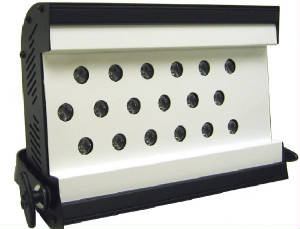 Lighting and Electronics out of Wappingers Falls New York introduced a new product the their WorkLite series of fixtures, the WorkLite LED at LDI this year.
The WorkLite LED uses 2.5 watt, high intensity white LEDs lamps at 150 lumens per LED. With 18 LEDs, that equals 2,700 lumens of output. The WorkLite produces 6,500 kelvin color temperature with a 48 degree field angle and 33 degree beam angle.
Since the fixture uses LEDs, the WorkLite LED is ideal for spaces that are looking to replace their tungsten or HID worklights with energy efficient LEDs. The fixture is low profile and light weight measuring in at 10.25″h x 15.3″w x 3.25″d and made from light weight aluminum.
The L&E WorkLite LED has an on board power supply and requires no modifications to operate on either 120v or 240v. The LEDs have a lamp life of 70,000 hours.
Production of the WorkLite LED has begun and is expected to begin shipping during the first quarter of 2010. The WorkLite is expected to be in the price range of $1,200. USD. For more information on the L&E WorkLite LED, visit L&E’s website at www.le-us.com.
The iSquint.net Podcast – Episode 2: The 2009 LDI Post Show Podcast
It took some time, but here it is, the 2nd episode of the iSquint Podcast. Jim from Jimonlight.com and I finally got a chance to sit down after a couple of weeks after the show to put our thoughts down into the 2009 LDI Post Show Podcast.
There were quite a few new things introduced, mentioned and hinted at while at the show. Jim and I talked at great lengths about some of the hottest and award winning products out there from LDI and share our views and opinions.
I personally had an amazing time at LDI. I got a chance to see a lot of new things, meet new friends, catch up with old friends and had just an all around great time in the sunshine state.
While down in Orlando, I pre-recorded a couple of interviews for future episodes of the iSquint Podcast as well as video taped some product demo, some of which are already posted on the iSquint YouTube channel. If you haven’t had a chance, visit my 2009 LDI Photo Set on Flickr.com to get an idea of what the show floor was like.
[podcast]http://isquint.net/wp-content/uploads/podcast/iSquint.net_Podcast-Episode_2.mp3[/podcast]
Mole Richardson Introduces MoleLED
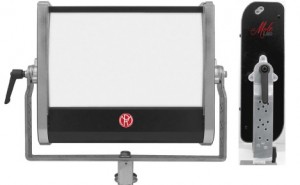 Mole Richardson, one of the oldest lighting company’s has stepped into the LED world this year at LDi with the announcement of their latest fixture, the MoleLED. Mole Richardson is a trusted name in the Film and Video world with the distinguishing pink lights. But don’t let the color throw you off, their fixtures are trusted by industry professionals around the world for their durability, design and of course output.
Mole worked with OSRAM Sylvania to develop the MoleLED using the OSRAM Sylvania proprietary Phosphor Dome Technology to offer a Tungsten and Daylight LED fixture. The MoleLED fixture consists of 12 OSRAM KREIOS LED circuit board, each containing 20 high output LEDs for a total of 240 individual LEDs, each topped with a remote phosphor dome. The phosphor domes are an OSRAM proprietary design, which are blue light activated to produce light in two exact color temperatures, Tungsten and Daylight.
Measuring in at 15″ high by 3.5″ deep and just 18.25″ wide and a total weight of only 13 lbs with the yoke, the MoleLED is perfect for location lighting were lightweight and small compact design is required. There is local or DMX controlled dimming from 100% to 10% with auto sensing power supply from 100-240 volts and uses just 0.6 amps max draw on a 110 volt AC power input.
To MoleLED is expected to being to ship early 2010. A pricing has not been released as of yet. To learn more about the MoleLED, visit Mole Richardson’s website at www.mole.com.
Baxter Controls Pocket iPhone DMX App
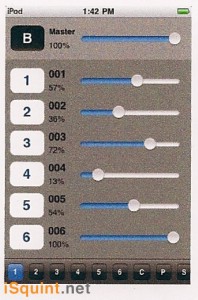 During LDI 2009, I got a chance to stop by the BCI or Baxter Controls booth to take a look at his latest product, the iPhone Virtual Pocket Console app. The iPhone app is still under development and is not ready for release as of yet. BCI did have a beta version of the App on their iPod Touch running the booth and the Par-B-Q cooker.
The Virtual Pocket Console App utilizes wireless network protocol to control DMX. The iPhone/iPod Touch connect to the BCI Pocket Console Net/DMX converter box to translate the signal to 5-pin DMX. I am still a little unsure if BCI is using Art-Net or not, but time will tell.
The Virtual Pocket Console can Patch up an entire universe of DMX512 and give you the ability to check dimmers, channel levels, and record simple looks.
A time frame or pricing has not been released yet. I am expecting to see something more about the iPhone app in the first quarter of 2010.
What to see more about the neat products from BCI, visit their website at www.dmx2go.com.
[nggallery id=16]