
ETC Announces Eos Family Software Update – v1.9.5
This morning ETC announced the long anticipated, and until 2.0 comes out, most significant update to the Eos family of consoles: software version 1.9.5.
The biggest update included in v1.9.5 is the addition of the Virtual Media Server. The VMS allows the creation of grids of fixture, to which static and animated images can be applied. It includes a variety of manipulation tools. Similar to an external media server, the desk maps channels as layers which can then be defined with content. A secondary software download, the Eos Family Pixel Mapping Installer, is required to add media content.
The second major improvement is the Color Picker has been updated so that it will correctly (or more so) assign colors to non-standard LED fixtures such as RGBA and RGBW. This will hopefully mean there are more third-party LED profiles in the software as well.
Another important feature worth noting is the change that Cue Releases now send channels back to their last active source. IE, if you had moving lights 10 thru 16 going in cue 5/5 running in the background and had to run cue list 10 for a keynote speaker, any fixtures in cue 5/5 will resume what they were doing previously.
In addition to the features mentioned above, a variety of other long asked for features have been included: Flash On/Off, Flexi-Encoder State, Shielded Submasters, Grand Master exempt channels, Non-Dim indicator, etc. For a full list, please see the release notes available at www.etcconnect.com.
As always, if you are not comfortable using your desk’s shell system, please call ETC’s tech support line before attempting to update the desk by yourself.
ETC Releases Updates to Congo and Eos Family Consoles
Time for some update to almost all of ETC’s family of consoles. ETC recommends that you download and update your console with the current version of the console software as these two release’s mainly deal minor issues that have been fixed since the last version update.
More from ETC’s announcement:
Congo v6.0.3
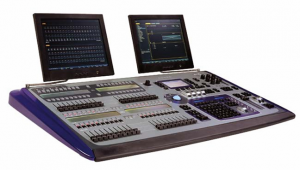 ETC is happy to announce the release of Congo v6.0.3 software for the Congo and Congo jr lighting control consoles, Congo Light Server and Net3™ Remote Video Interface units. This version is mainly to resolve issues that many users have encountered in the field with previous v6 releases. It is highly recommended that end-users currently running v6.0.0-v6.0.2 software update to v6.0.3 as soon as possible. This version has been rigorously tested not only in our labs, but in over 30 beta sites worldwide in varying configurations of stand-alone, server-backup and server-client systems. We believe this version addresses issues of “hour-glassing” and system slowdowns, as well as the unhandled crashes that caused us to pull v6.0.2 from our Web site.
Congo v6.0.3 software and Release Notes can be found in the Downloads section of www.etcconnect.com . There is also a v6.0.3 installer for Congo Offline Editor for Macintosh available for free download, as well. All consoles, Light Servers and RVI/Client PCs in a system must be updated at the same time.
Eos v1.8.1
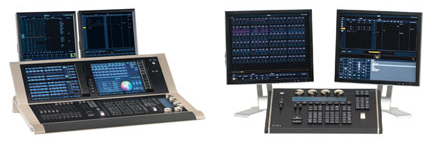 ETC is also announcing a new version of Eos-family software. Version 1.8.1 is a software patch that fixes a number of issues, including system slowdowns caused by mirror mode (this can be evidenced even when mirror mode is not deployed), and Universal Wing startup issues. It is recommended that all Eos-family products be updated at the earliest convenience.
You can access the Release Note and software from the Downloads pages of Eos, Ion®, Element™, Eos and Ion RPU and Net3 RVI. This release does not require a new Macintosh offline build (users will still use v1.8), nor does it require a new manual or hotkeys document. You can download the Eos v1.8.1 software update from the download section of ETC’s website, www.etcconnect.com.
Review: ETC Element Lighting Console

At USITT this year, Electronic Theatre Controls announced the birth of their latest addition to the EOS line of lighting consoles, the Element. Since that announcement, we have been reporting updates on the progress and anticipated ship dates. To further update the progress of the Element, ETC has already begun to take orders through their dealer network for the console. While they are taking order, the Element is expected to being shipping sometime this summer. While we wait for ETC to begin shipping the Element, the kind folks from Middleton were nice enough to send us a prototype with Beta software Version 1.5 of the Element.
To Read the entire review: (more…)
Update: More Info on the ETC Element Console
We just learned more information about the ETC Element Lighting Console. Sounds like ETC will be accepting orders of the new console through their dealership network beginning May 4. While they begin to take orders, actual consoles will not begin to ship until late summer. We have also learned the new pricing range of the four version of the console.
- Element 40, 250 Channels – $5,500
- Element 40, 500 Channels – $6,000
- Element 60, 250 Channels – $7,000
- Element 60, 500 Channels – $7,500
To learn more about the Element Console, visit ETC’s mini website at www.etcconnect.com/element. To order you Element now, visit the dealer section of their website to local the closes one to you.
ETC Element Console – More Details
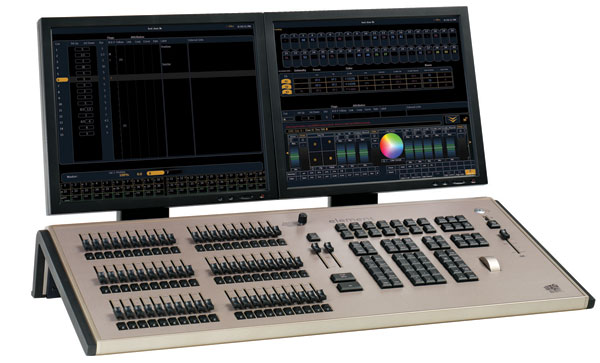
Yesterday we posted about the long rumored Element Console from ETC. Today, the start of USITT Stage Expo in Cincinnati, we have more information and photos.
The Element Console is based on ETC’s Eos control operating system but with a simplified feature set in an all in one package. The Element is designed for smaller lighting systems with the larger selection of faders on board. Which can either be channel faders or submasters at the turn of a switch, similar to the Congo’s master and channel knob.
The Element comes in two hardware versions based on fader count. That being the Element 40 or the Element 60. From there each supports either 250 or 500 channels depending on how many you need. All the models of the Element support up 2 universes of DMX on board or via ETCNet. The thing to remember as in most modern lighting consoles, one channel now can equal one device. That one device can be a one DMX address dimmer, or a 36 DMX address moving light.
Channel Faders you say? The element gives you 40 or 60, depending on which model you go with. These are true LTP (Last Takes Presidents) channel faders. This means that building shows from channel faders for use as submasters or cues is quick and easy, thus not requiring channel and intensirt enter via the keypad. Another nice feature about the channel faders is that you can edit levels of channels stored in subs or cues all while live.
Now you want to play with submaster on faders, no problem, turn a switch and there you go. The faders that were once channel faders now act as submaster faders. On the Element 60, you have 20 dedicated submaster on board and then an additional 40 with the switchable 40 channel/submaster fafers.
The Element is design for smaller lighting systems and thus not needing the ability to have 999 cue list likes is big brother, the Eos. The Element only has the ability to run one cue list. But when the time is right, a novice can become a master of their domain by jumping into more complex timing functions such as cue parts, follow/hang to create more intelligent lighting transitions.
More information will be coming on the Element as the time progresses. In the mean time, visit the newest section of ETC’s website, www.etcconnect.com/element. Now what everyone has been waiting for, more pictures!
[nggallery id=3]
ETC Announces New Lighting Console – The Element
Over the past few months we have been hinting numerous times about the long rumored replacement of the ETC Express Console (1, 2, 3, 4, 5) . This finally confirms the rumor.
Directly from the Middleton:
Industry professionals have been asking for an ETC lighting control console designed expressly for modest rigs and maximum hands-on fader control. In response, we are introducing the new ETC Element™ consoles. We will unveil them tomorrow at USITT in Cincinnati, Thursday, March 19th, 2009.
ETC defined the basic lighting controller when the Express™ console was introduced in 1995. We’ve seen over time that the basic lighting rig has changed. With Element, we’ve redefined what ‘basic lighting console’ means, without losing the ease of use of Express. Element comes in two hardware versions, based on fader count (the Element 40 or the Element 60). Each supports a full two universes of DMX output and either 250 or 500 channels.
Element is directed at smaller venues like schools and houses of worship who depend on single console operators or volunteer staffers. It is designed to handle rigs outfitted predominantly with conventional fixtures, while also accommodating some LED fixtures and/or a small number of simple moving lights. We based Element on the Eos® control system but with a simplified feature set in a stand-alone console. Integral faders, a single cue list and command prompts echoing those of the Express console make operation of an Element console simple and direct.
Element navigates basic accessory, LED and moving-light control. At the press of a button, the console’s On Demand ML Controls appear on screen with tools designed to control smaller numbers of non-intensity equipment like scrollers, gobo rotators and mirror heads for conventional fixtures. Element’s color and gel-picker tools simplify the process further, applying just the right colors to LEDs and color-mixing accessories and fixtures.
ETC plans to begin shipping the Element this summer. Pricing has not been released. If you are attending USITT in Cincinnati, make sure to stop by ETC’s booth, 1100 , for the offical release.